


Acer Aspire Spin 14 (ASP14-52MTN) vs Acer Aspire 3 Spin 14
For most people, the Aspire Spin 14 (Core Ultra 5 115U) is the one to get. Its processor is quicker day to day, it has more memory and its battery lasts longer. The Aspire 3 Spin 14 (Core i3-N305) doesn't come out ahead on any of the differences here.
We earn a commission from qualifying Amazon purchases made through our links, at no extra cost to you. This never affects our specs. How we make money.
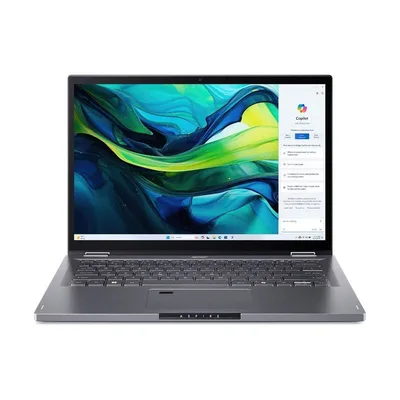
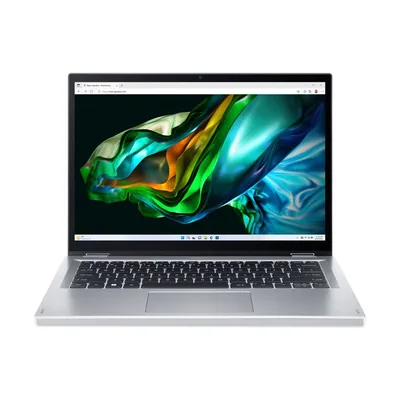
Key differences
- Processor Aspire Spin 14 (Core Ultra 5 115U) wins
The Aspire Spin 14 (Core Ultra 5 115U) has a faster class of processor. It keeps up better with several apps at once, while the Aspire 3 Spin 14 (Core i3-N305) suits one task at a time.
- Memory Aspire Spin 14 (Core Ultra 5 115U) wins
The Aspire Spin 14 (Core Ultra 5 115U) has 16 GB of memory, while the Aspire 3 Spin 14 (Core i3-N305) has 8 GB. That helps when you keep many apps, tabs or big projects open. Neither can be upgraded later.
- Battery life Aspire Spin 14 (Core Ultra 5 115U) wins
The Aspire Spin 14 (Core Ultra 5 115U) is rated for 18 hours on a charge and the Aspire 3 Spin 14 (Core i3-N305) for 10. Both figures are best cases, and real use comes in lower on each.
- Storage Aspire Spin 14 (Core Ultra 5 115U) wins
The Aspire Spin 14 (Core Ultra 5 115U) has a 512 GB drive, while the Aspire 3 Spin 14 (Core i3-N305) has 256 GB. The bigger drive holds far more photos, music and games before you have to clear space.
- Ports Aspire Spin 14 (Core Ultra 5 115U) wins
Only the Aspire Spin 14 (Core Ultra 5 115U) has Thunderbolt or USB4, so you can use 40 Gbps docks that run several screens and fast external drives.
- S mode Aspire Spin 14 (Core Ultra 5 115U) wins
The Aspire 3 Spin 14 (Core i3-N305) comes in Windows S mode, so it only installs apps from the Microsoft Store until you switch S mode off. Switching is free but one-way. The Aspire Spin 14 (Core Ultra 5 115U) runs any Windows program from the start.
Which one should you choose?
Choose the Aspire Spin 14 (Core Ultra 5 115U) if…
- you want everyday work to feel quicker
- you keep lots of apps and tabs open
- you work away from a socket for long stretches
- you keep a big photo, music or game library on the laptop
Choose the Aspire 3 Spin 14 (Core i3-N305) if…
- you can do without what the Aspire Spin 14 (Core Ultra 5 115U) adds
Full spec comparison
Both run Windows and fold into a tablet, so the choice comes down to the details. The real differences are processor power, memory and battery life.
Green cells with a ✓ mark the better spec in that row. Tick "Show differences only" to hide the rows where they match.
Performance
| Spec | Acer Aspire Spin 14 (ASP14-52MTN) | Acer Aspire 3 Spin 14 |
|---|---|---|
| Processor | Intel Core Ultra 5 115U | Intel Core i3-N305 |
| Graphics | Intel Graphics | Intel UHD Graphics |
| Memory (RAM) | 16 GB | 8 GB |
| Memory type | LPDDR5X-6400 | LPDDR5 |
| Maximum memory | 16 GB | 8 GB |
| Memory upgrades | Soldered (not upgradeable) | Soldered (not upgradeable) |
| Storage | 512 GB | 256 GB |
| Storage type | SSD | SSD |
| Storage interface | PCIe 4.0 NVMe M.2 | PCIe NVMe M.2 |
| Storage slots | 1 | — |
Screen
| Spec | Acer Aspire Spin 14 (ASP14-52MTN) | Acer Aspire 3 Spin 14 |
|---|---|---|
| Screen size | 14" | 14" |
| Resolution | Full HD+ (1920 x 1200) | Full HD+ (1920 x 1200) |
| Aspect ratio | 16:10 | 16:10 |
| Panel | IPS | IPS |
| Refresh rate | 60 Hz | 60 Hz |
| Brightness | 250 nits | — |
| Colour range | 45% NTSC | — |
| Finish | Matte | — |
| Touchscreen | Yes | Yes |
Battery and size
The Aspire Spin 14 (Core Ultra 5 115U) charges over USB-C, so one charger can do your phone and laptop, while the Aspire 3 Spin 14 (Core i3-N305) needs its own charger.
| Spec | Acer Aspire Spin 14 (ASP14-52MTN) | Acer Aspire 3 Spin 14 |
|---|---|---|
| Battery life (maker claim) | Up to 18 hours | Up to 10 hours |
| Battery capacity | 53 Wh | 40 Wh |
| Charger | 65 W | 45 W |
| Charges via | USB-C | barrel (DC-in) |
| Weight | 1.5 kg | 1.5 kg |
| Dimensions | 318.5 x 225.5 x 13.4-21.1 mm | 319.8 x 227.9 x 18.9 mm |
| Hinge | 360-degree convertible | Convertible (folder) |
| Colour | Iron | Pure Silver |
| Colours available | Iron | — |
Ports and wireless
The Aspire Spin 14 (Core Ultra 5 115U) has Wi-Fi 6E, the Aspire 3 Spin 14 (Core i3-N305) Wi-Fi 6. The newer standard gets more out of a modern router.
| Spec | Acer Aspire Spin 14 (ASP14-52MTN) | Acer Aspire 3 Spin 14 |
|---|---|---|
| Ports | 2x USB-A 3.2 Gen 1, 1x USB4 Gen 2x2, 1x Thunderbolt 4, 1x HDMI (version not published), 1x 3.5 mm audio | 2x USB-A 3.2 Gen 1, 1x USB-C 3.2 Gen 2 (10 Gbps, DisplayPort), 1x HDMI, 1x 3.5 mm combo audio, 1x DC-in |
| Thunderbolt / USB4 | Thunderbolt 4 and USB4 Gen 2x2 | None |
| Card reader | None | None |
| Ethernet | None | None |
| Wi-Fi | Wi-Fi 6E | Wi-Fi 6 |
| Bluetooth | Bluetooth 5.3 | Bluetooth 5.1 |
| Mobile data | None | None |
Features
| Spec | Acer Aspire Spin 14 (ASP14-52MTN) | Acer Aspire 3 Spin 14 |
|---|---|---|
| Webcam | 1080p | — |
| Backlit keyboard | No | — |
| Keyboard | AcerSense key, Caps Lock indicator, microphone mute indicator | — |
| Login | Fingerprint | — |
| Number pad | No | No |
| Touchpad | Microsoft Precision Touchpad certified | Multi-touch gestures, Microsoft Precision Touchpad, moisture resistant, antimicrobial coating |
| Speakers | 2 speakers | 2 speakers, stereo |
| Microphones | built-in microphone | built-in microphone |
| Pen | Included | Supported (sold separately) |
| Security | Kensington lock slot, BIOS passwords (user, supervisor, SSD) | Kensington lock slot, BIOS user and supervisor passwords |
Software and model
| Spec | Acer Aspire Spin 14 (ASP14-52MTN) | Acer Aspire 3 Spin 14 |
|---|---|---|
| Operating system | Windows 11 Home | Windows 11 Home in S mode |
| Model number | NX.J3LEK.003 | NX.KN1AA.005 |
| Released | — | 2023 |