


Acer Chromebook Spin 314 (CP314-2HN) vs Lenovo IdeaPad Slim 3i Chromebook Plus (14IAN8)
For most people, the IdeaPad Slim 3i Chromebook Plus is the one to get. Its processor is quicker day to day, it has more memory and it has more storage. The Chromebook Spin 314 makes more sense if you like to tap and scroll on the screen.
We earn a commission from qualifying Amazon purchases made through our links, at no extra cost to you. This never affects our specs. How we make money.
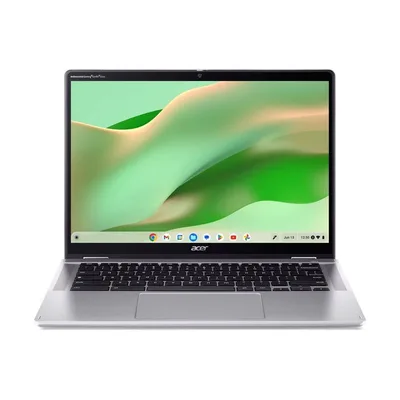
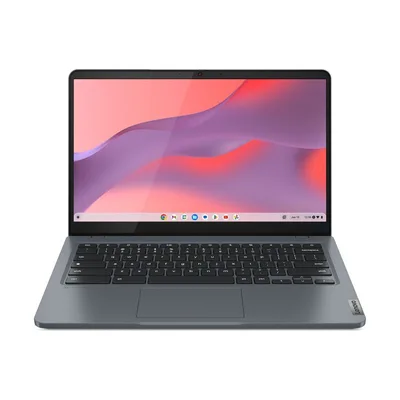
Key differences
- Processor IdeaPad Slim 3i Chromebook Plus wins
The IdeaPad Slim 3i Chromebook Plus has the stronger processor, a step above the entry-level N100 in the Chromebook Spin 314. It keeps up better with several apps and tabs at once.
- Memory IdeaPad Slim 3i Chromebook Plus wins
The IdeaPad Slim 3i Chromebook Plus has 8 GB of memory, while the Chromebook Spin 314 has 4 GB. That helps when you keep many apps, tabs or big projects open. Neither can be upgraded later.
- Storage IdeaPad Slim 3i Chromebook Plus wins
The IdeaPad Slim 3i Chromebook Plus has a 256 GB drive, while the Chromebook Spin 314 has 128 GB. More room means fewer trips to the cloud or an external drive for photos, music and games.
- Touchscreen Chromebook Spin 314 wins
Only the Chromebook Spin 314 has a touchscreen, handy for scrolling, signing documents and quick taps.
- Webcam IdeaPad Slim 3i Chromebook Plus wins
The IdeaPad Slim 3i Chromebook Plus has the sharper webcam, so you look clearer on video calls.
- Keyboard IdeaPad Slim 3i Chromebook Plus wins
Of the two, only the IdeaPad Slim 3i Chromebook Plus has a backlit keyboard, which makes typing in a dim room or on a night train much easier.
Which one should you choose?
Choose the Chromebook Spin 314 if…
- you like to tap and scroll on the screen
- you move big files around often
Choose the IdeaPad Slim 3i Chromebook Plus if…
- you want everyday work to feel quicker
- you keep lots of apps and tabs open
- you keep a big photo, music or game library on the laptop
- you're on video calls a lot
Full spec comparison
Both run ChromeOS, so they're aimed at much the same people. The real differences are processor power, memory and storage.
Green cells with a ✓ mark the better spec in that row. Tick "Show differences only" to hide the rows where they match.
Performance
The Chromebook Spin 314 uses an SSD, which is quicker than the slower eMMC storage in the IdeaPad Slim 3i Chromebook Plus. Apps open and files copy faster.
| Spec | Acer Chromebook Spin 314 (CP314-2HN) | Lenovo IdeaPad Slim 3i Chromebook Plus (14IAN8) |
|---|---|---|
| Processor | Intel N100 | Intel Core i3-N305 |
| Graphics | Intel UHD Graphics | Intel UHD Graphics |
| Memory (RAM) | 4 GB | 8 GB |
| Memory type | LPDDR5 | LPDDR5-4800 |
| Maximum memory | 4 GB | 8 GB |
| Memory upgrades | Soldered (not upgradeable) | Soldered (not upgradeable) |
| Storage | 128 GB | 256 GB |
| Storage type | SSD | eMMC |
| Storage interface | M.2 SSD | eMMC 5.1 |
| Storage slots | — | 0 |
Screen
The Chromebook Spin 314 has a slightly taller screen (16:10 against 16:9), so you see more of a document or web page without scrolling.
| Spec | Acer Chromebook Spin 314 (CP314-2HN) | Lenovo IdeaPad Slim 3i Chromebook Plus (14IAN8) |
|---|---|---|
| Screen size | 14" | 14" |
| Resolution | Full HD+ (1920 x 1200) | Full HD (1920 x 1080) |
| Aspect ratio | 16:10 | 16:9 |
| Panel | IPS | IPS |
| Refresh rate | 60 Hz | 60 Hz |
| Variable refresh (VRR) | No | No |
| Brightness | — | 300 nits |
| Colour range | 45% NTSC | 45% NTSC |
| HDR | None | None |
| Finish | — | Matte |
| Touchscreen | Yes | No |
Battery and size
The IdeaPad Slim 3i Chromebook Plus is rated for slightly longer on a charge, 11 hours against 10, which is too small a gap to notice day to day.
| Spec | Acer Chromebook Spin 314 (CP314-2HN) | Lenovo IdeaPad Slim 3i Chromebook Plus (14IAN8) |
|---|---|---|
| Battery life (maker claim) | Up to 10 hours | Up to 11 hours |
| Battery capacity | 53 Wh | 57 Wh |
| Charger | 65 W | 45 W |
| Charges via | — | USB-C |
| Weight | 1.57 kg | 1.5 kg |
| Dimensions | 319.9 x 229.9 x 21.9 mm | 324.4 x 216.2 x 19.3 mm |
| Materials | — | aluminium top, PC-ABS bottom |
| Hinge | 360-degree convertible | — |
| Colour | Silver | Storm Grey |
| Colours available | Silver | Storm Grey |
Ports and wireless
| Spec | Acer Chromebook Spin 314 (CP314-2HN) | Lenovo IdeaPad Slim 3i Chromebook Plus (14IAN8) |
|---|---|---|
| Ports | 2x USB-A 3.2 Gen 1, 1x USB-C 3.2 Gen 1, 1x HDMI | 2x USB-A 3.2 Gen 1, 1x USB-C 3.2 Gen 2 (charging, data, DisplayPort), 1x HDMI 1.4b, 1x 3.5 mm headphone/microphone combo |
| Thunderbolt / USB4 | None | None |
| External displays (max) | — | 2 |
| Card reader | None | None |
| Ethernet | None | None |
| Wi-Fi | Wi-Fi 6E | Wi-Fi 6E |
| Wi-Fi card | Intel Wi-Fi 6E AX211 | Intel Wi-Fi 6E AX211 |
| Bluetooth | Bluetooth 5.2 or above | Bluetooth 5.3 |
| Mobile data | None | None |
Features
| Spec | Acer Chromebook Spin 314 (CP314-2HN) | Lenovo IdeaPad Slim 3i Chromebook Plus (14IAN8) |
|---|---|---|
| Webcam | 720p | 1080p |
| Webcam privacy | physical shutter | physical shutter |
| Backlit keyboard | No | Yes |
| Keyboard | — | 6-row spill-resistant Chrome keyboard with anti-pick keycaps |
| Number pad | — | No |
| Touchpad | OceanGlass touchpad | buttonless Mylar Precision TouchPad, 60.5 x 104 mm |
| Speakers | 2 speakers | 2x 2 W stereo, Waves MaxxAudio |
| Microphones | integrated microphone | dual-array |
| Pen | — | No |
| Security | Discrete H1 TPM for Chromebook, Camera shutter, Kensington lock (Nano-type) | Google Security Chip H1, Kensington Nano Security Slot, camera privacy shutter |
Software and model
| Spec | Acer Chromebook Spin 314 (CP314-2HN) | Lenovo IdeaPad Slim 3i Chromebook Plus (14IAN8) |
|---|---|---|
| Operating system | ChromeOS | ChromeOS Plus |
| Updates until | June 2033 | June 2033 |
| Model number | NX.KYHEK.005 | 83BN001EUK |
| Released | — | 2023 |