


ASUS Chromebook Plus 14 (CX3402CVA) vs Acer Chromebook Spin 312 (CP312-1H)
It's a close call: pick the Chromebook Plus 14 if you want everyday work to feel quicker, or the Chromebook Spin 312 if you work away from a socket for long stretches.
We earn a commission from qualifying Amazon purchases made through our links, at no extra cost to you. This never affects our specs. How we make money.
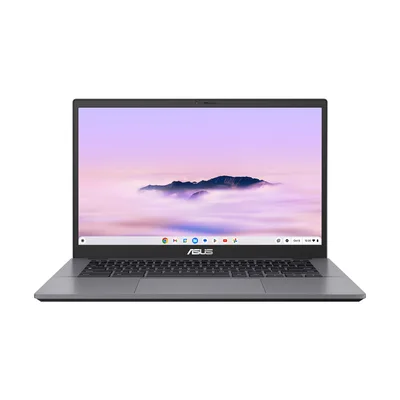
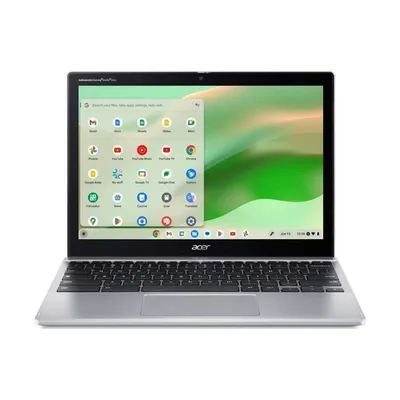
Key differences
- Processor Chromebook Plus 14 wins
The Chromebook Plus 14 has the stronger processor, a step above the entry-level N100 in the Chromebook Spin 312. It keeps up better with several apps and tabs at once.
- Memory Chromebook Plus 14 wins
The Chromebook Plus 14 has 8 GB of memory, while the Chromebook Spin 312 has 4 GB. That helps when you keep many apps, tabs or big projects open. Neither can be upgraded later.
- Battery life Chromebook Spin 312 wins
The Chromebook Spin 312 is rated for 13 hours on a charge and the Chromebook Plus 14 for 10. Both figures are best cases, and real use comes in lower on each.
- Updates Chromebook Spin 312 wins
Google promises updates for the Chromebook Spin 312 until 2033, and for the Chromebook Plus 14 until 2032. After that a Chromebook stops getting security fixes, so the later date means a longer useful life.
- Screen size Depends on you
The Chromebook Plus 14 has a 14-inch screen, the Chromebook Spin 312 a 12.2-inch one. The bigger screen is easier for spreadsheets, split-screen work and films, and the smaller one is easier to carry.
- Pen Chromebook Spin 312 wins
Only the Chromebook Spin 312 works with a pen, so you can write notes or sketch straight on the screen.
Which one should you choose?
Choose the Chromebook Plus 14 if…
- you want everyday work to feel quicker
- you keep lots of apps and tabs open
- you want a bigger screen to work on
- you're on video calls a lot
Choose the Chromebook Spin 312 if…
- you work away from a socket for long stretches
- you want it to stay updated for as long as possible
- you want something easier to carry
- you want to sketch or mark up documents with a pen
Full spec comparison
Both run ChromeOS, so the choice comes down to the details. The real differences are processor power, memory and battery life.
Green cells with a ✓ mark the better spec in that row. Tick "Show differences only" to hide the rows where they match.
Performance
| Spec | ASUS Chromebook Plus 14 (CX3402CVA) | Acer Chromebook Spin 312 (CP312-1H) |
|---|---|---|
| Processor | Intel Core 3 100U | Intel N100 |
| Graphics | Intel Graphics | Intel UHD Graphics |
| Memory (RAM) | 8 GB | 4 GB |
| Memory type | LPDDR5-5200 | LPDDR5 |
| Maximum memory | 8 GB | 4 GB |
| Memory upgrades | Soldered (not upgradeable) | Soldered (not upgradeable) |
| Storage | 128 GB | 128 GB |
| Storage type | UFS | eMMC |
| Storage interface | UFS | eMMC |
| Storage slots | — | 0 |
Screen
The Chromebook Spin 312 has a slightly sharper screen, so text looks crisper and you can fit more on screen comfortably. The Chromebook Spin 312 has a slightly taller screen (16:10 against 16:9), so you see more of a document or web page without scrolling.
| Spec | ASUS Chromebook Plus 14 (CX3402CVA) | Acer Chromebook Spin 312 (CP312-1H) |
|---|---|---|
| Screen size | 14" | 12.2" |
| Resolution | Full HD (1920 x 1080) | Full HD+ (1920 x 1200) |
| Aspect ratio | 16:9 | 16:10 |
| Panel | LCD | IPS |
| Refresh rate | 60 Hz | 60 Hz |
| Brightness | 250 nits | — |
| Colour range | 45% NTSC | 50% NTSC |
| Finish | Matte | Glossy |
| Touchscreen | Yes | Yes |
Battery and size
The Chromebook Spin 312 weighs 1.29 kg and the Chromebook Plus 14 1.44 kg, so there's little in it.
| Spec | ASUS Chromebook Plus 14 (CX3402CVA) | Acer Chromebook Spin 312 (CP312-1H) |
|---|---|---|
| Battery life (maker claim) | Up to 10 hours | Up to 13 hours |
| Battery capacity | 50 Wh | 50 Wh |
| Charger | 45 W | 65 W |
| Charges via | USB-C | — |
| Weight | 1.44 kg | 1.29 kg |
| Dimensions | 326.4 x 214.3 x 18.7 mm | 289.9 x 204.9 x 19.9 mm |
| Durability | US MIL-STD 810H military-grade standard | — |
| Hinge | — | 360-degree convertible |
| Colour | Grey | Silver |
| Colours available | Rocky Grey, White, Staid Black | Silver |
Ports and wireless
| Spec | ASUS Chromebook Plus 14 (CX3402CVA) | Acer Chromebook Spin 312 (CP312-1H) |
|---|---|---|
| Ports | 2x USB-C 3.2 Gen 1 (display, power delivery), 2x USB-A 3.2 Gen 1, 1x HDMI 1.4, 1x 3.5 mm combo audio | 2x USB-A 3.2 Gen 1, 1x USB-C 3.2 Gen 1, 1x HDMI (version not published) |
| Thunderbolt / USB4 | None | None |
| Card reader | None | None |
| Ethernet | None | None |
| Wi-Fi | Wi-Fi 6E | Wi-Fi 6E |
| Wi-Fi card | — | Intel Wi-Fi 6E AX211 |
| Bluetooth | Bluetooth 5.4 | Bluetooth 5.2 |
| Mobile data | None | None |
Features
The Chromebook Plus 14 has the sharper webcam, so you look clearer on video calls.
| Spec | ASUS Chromebook Plus 14 (CX3402CVA) | Acer Chromebook Spin 312 (CP312-1H) |
|---|---|---|
| Webcam | 1080p | 720p |
| Webcam privacy | physical shutter | physical shutter |
| Backlit keyboard | — | No |
| Keyboard | Chiclet keyboard, 1.4 mm key travel | — |
| Number pad | No | No |
| Touchpad | — | OceanGlass touchpad |
| Speakers | Built-in speaker | 2 speakers |
| Microphones | Built-in array microphone | built-in microphone |
| Pen | No | Supported (sold separately) |
| Security | Google Titan C security chip | Discrete H1 TPM, Kensington lock |
Software and model
| Spec | ASUS Chromebook Plus 14 (CX3402CVA) | Acer Chromebook Spin 312 (CP312-1H) |
|---|---|---|
| Operating system | ChromeOS Plus | ChromeOS |
| Updates until | June 2032 | June 2033 |
| Model number | CX3402CVA-PQ1398 | NX.KYTEK.007 |
| Released | 2026 | — |