


HP Envy x360 14 (2024, older gen) vs HP OmniBook Ultra Flip 14 (2024, older gen)
For most people, the OmniBook Ultra Flip 14 is the one to get. It has an OLED screen, its screen is sharper and it has more memory. Choose the Envy x360 14 instead if you connect to a TV or monitor.
We earn a commission from qualifying Amazon purchases made through our links, at no extra cost to you. This never affects our specs. How we make money.
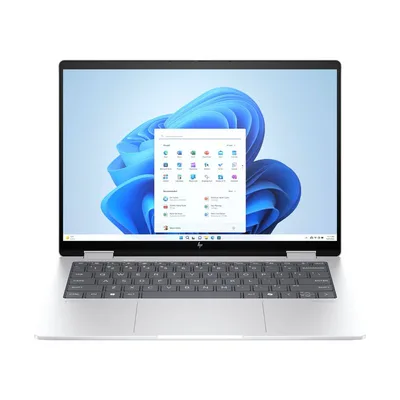
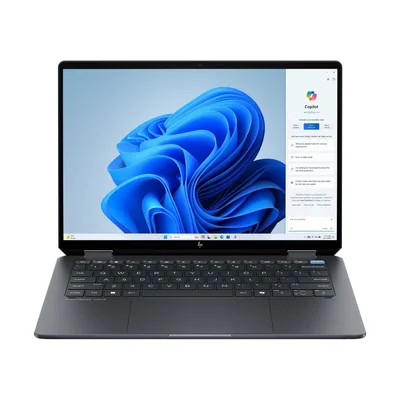
Key differences
- Screen OmniBook Ultra Flip 14 wins
The OmniBook Ultra Flip 14 has an OLED screen, with true blacks and rich colour, while the Envy x360 14 has an IPS panel. Films and photos look noticeably better on the OLED.
- Sharpness OmniBook Ultra Flip 14 wins
The OmniBook Ultra Flip 14 has a noticeably sharper screen, so text looks crisper and you can fit more on screen comfortably.
- Memory OmniBook Ultra Flip 14 wins
The OmniBook Ultra Flip 14 has 32 GB of memory, while the Envy x360 14 has 16 GB. That helps when you keep many apps, tabs or big projects open. Neither can be upgraded later.
- Storage OmniBook Ultra Flip 14 wins
The OmniBook Ultra Flip 14 has a 2 TB drive, while the Envy x360 14 has 1 TB. More room means fewer trips to the cloud or an external drive for photos, music and games.
- Brightness OmniBook Ultra Flip 14 wins
The OmniBook Ultra Flip 14 has the brighter screen, 400 nits against 300, so it's easier to read near a window or on a train.
- Ports Depends on you
Each has ports the other lacks: the Envy x360 14 has HDMI and USB-A, so you can connect a TV or monitor and plug in USB sticks and older accessories without an adapter, and the OmniBook Ultra Flip 14 has Thunderbolt or USB4, so you can use 40 Gbps docks that run several screens and fast external drives.
Which one should you choose?
Choose the Envy x360 14 if…
- you connect to a TV or monitor
Choose the OmniBook Ultra Flip 14 if…
- you watch a lot of films or work with photos
- you read or write a lot on screen
- you keep lots of apps and tabs open
- you keep a big photo, music or game library on the laptop
Full spec comparison
Both run Windows and fold into a tablet, so they suit similar buyers. The real differences are the screen and memory.
Green cells with a ✓ mark the better spec in that row. Tick "Show differences only" to hide the rows where they match.
Performance
| Spec | HP Envy x360 14 (2024, older gen) | HP OmniBook Ultra Flip 14 (2024, older gen) |
|---|---|---|
| Processor | AMD Ryzen 7 8840HS | Intel Core Ultra 7 258V |
| Graphics | AMD Radeon Graphics | Intel Arc Graphics 140V |
| AI engine (NPU) | — | 47 TOPS |
| Memory (RAM) | 16 GB | 32 GB |
| Memory type | LPDDR5-6400 | LPDDR5X-8533 |
| Maximum memory | 16 GB | 32 GB |
| Memory upgrades | Soldered (not upgradeable) | Soldered (not upgradeable) |
| Storage | 1 TB | 2 TB |
| Storage type | SSD | SSD |
| Storage interface | PCIe 4.0 NVMe M.2 | PCIe 4.0 NVMe M.2 2280 |
| Storage slots | — | 1 |
Screen
The OmniBook Ultra Flip 14 has the smoother screen, 120Hz against 60Hz, so scrolling and moving windows look smoother.
| Spec | HP Envy x360 14 (2024, older gen) | HP OmniBook Ultra Flip 14 (2024, older gen) |
|---|---|---|
| Screen size | 14" | 14" |
| Resolution | Full HD+ (1920 x 1200) | 3K (2880 x 1800) |
| Aspect ratio | 16:10 | 16:10 |
| Panel | IPS | OLED |
| Refresh rate | 60 Hz | 120 Hz |
| Variable refresh (VRR) | No | Yes |
| Brightness | 300 nits | 400 nits |
| Colour range | 62.5% sRGB | 100% DCI-P3 |
| HDR | — | HDR 500 (500 nits) |
| Finish | Glossy | Glossy |
| Touchscreen | Yes | Yes |
| Pen standard | — | MPP 2.0 |
Battery and size
The OmniBook Ultra Flip 14 is rated for 20.5 hours on a charge and the Envy x360 14 for 17.5. Both figures are best cases, and real use comes in lower on each.
| Spec | HP Envy x360 14 (2024, older gen) | HP OmniBook Ultra Flip 14 (2024, older gen) |
|---|---|---|
| Battery life (maker claim) | Up to 17.5 hours | Up to 20.5 hours |
| Battery capacity | 59 Wh | 64 Wh |
| Charger | 65 W | 65 W |
| Charges via | USB-C | USB-C |
| Fast charging | 50% in 30 minutes | about 50% in 45 min (system off) |
| Weight | 1.39 kg | 1.34 kg |
| Dimensions | 313.3 x 218.9 x 16.9 mm | 313.7 x 216.2 x 14.9 mm |
| Materials | recycled metal in cover, keyboard frame, base and hinge caps | recycled metal cover, keyboard frame, base and hinge caps; sandblasted anodized finish; ocean-bound plastic in speaker enclosures and bezel |
| Hinge | 360-degree convertible | convertible (laptop, stand, tent and tablet modes) |
| Colour | Glacier silver | Eclipse gray |
| Colours available | Glacier silver | Eclipse gray, Atmospheric blue |
Ports and wireless
The OmniBook Ultra Flip 14 has Wi-Fi 7, the Envy x360 14 Wi-Fi 6E. The newer standard only pays off if your router supports it, so it's a small edge.
| Spec | HP Envy x360 14 (2024, older gen) | HP OmniBook Ultra Flip 14 (2024, older gen) |
|---|---|---|
| Ports | 2x USB-C 10Gbps (both support USB Power Delivery charging, DisplayPort 1.4a, HP Sleep and Charge), 2x USB-A 10Gbps (one with HP Sleep and Charge), 1x HDMI 2.1, 1x 3.5 mm headphone/microphone combo | 1x USB-C 3.2 Gen 2 10Gbps (charging, DisplayPort 1.4a, Sleep and Charge), 2x Thunderbolt 4 USB-C 40Gbps (charging, DisplayPort 2.1, Sleep and Charge), 1x 3.5 mm headphone/mic combo |
| Thunderbolt / USB4 | None | Thunderbolt 4 |
| Card reader | None | None |
| Ethernet | None | None |
| Wi-Fi | Wi-Fi 6E | Wi-Fi 7 |
| Wi-Fi card | MediaTek Wi-Fi 6E MT7922 | Intel Wi-Fi 7 BE201 |
| Bluetooth | Bluetooth 5.3 | Bluetooth 5.4 |
| Mobile data | None | None |
Features
| Spec | HP Envy x360 14 (2024, older gen) | HP OmniBook Ultra Flip 14 (2024, older gen) |
|---|---|---|
| Webcam | 5MP + IR | 9 MP IR |
| Webcam privacy | physical shutter | physical shutter |
| Backlit keyboard | Yes | Yes |
| Keyboard | full-size backlit soft grey keyboard | backlit island-style, full-size, Copilot key, mic mute key, audio mute key, HP Hubs Launcher key |
| Login | — | Fingerprint |
| Number pad | No | No |
| Touchpad | HP Imagepad | haptic touchpad |
| Speakers | dual speakers, DTS:X Ultra, HP Audio Boost, Poly Studio | quad speakers, DTS:X Ultra, HP Audio Boost 2.0, Poly Studio |
| Microphones | dual-array digital microphones | dual-array digital microphones (beam forming, echo cancellation, noise suppression) |
| Pen | — | Included |
| Security | firmware TPM, mic mute key, camera privacy shutter | TPM 2.0 (discrete), fingerprint reader, camera privacy shutter, microphone mute key |
Software and model
| Spec | HP Envy x360 14 (2024, older gen) | HP OmniBook Ultra Flip 14 (2024, older gen) |
|---|---|---|
| Operating system | Windows 11 Home | Windows 11 Home |
| Model number | A2WA0EA#ABU | B20FFEA#ABU |
| Released | 2024 | 2024 |