


Lenovo IdeaPad Flex 3 Chromebook (15IJL7) vs Lenovo IdeaPad 3 Chromebook
For most people, the IdeaPad Flex 3 Chromebook (15IJL7) is the one to get. Its screen looks better from an angle, it gets updates for longer and its screen is brighter. The IdeaPad 3 Chromebook makes more sense if you want something easier to carry.
We earn a commission from qualifying Amazon purchases made through our links, at no extra cost to you. This never affects our specs. How we make money.
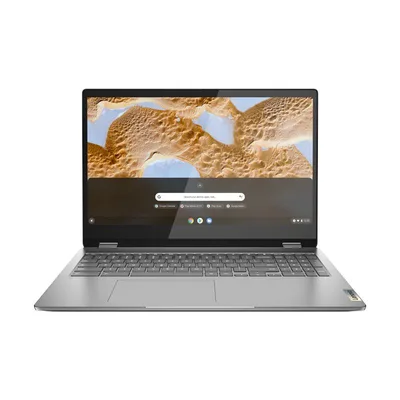
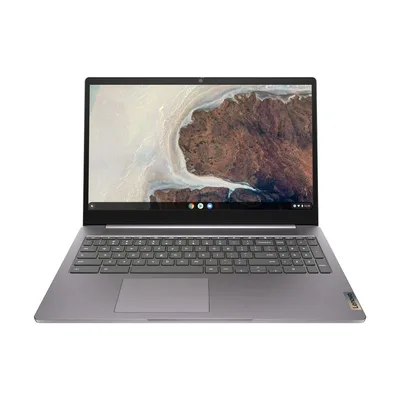
Key differences
- Screen IdeaPad Flex 3 Chromebook (15IJL7) wins
The IdeaPad Flex 3 Chromebook (15IJL7) has an IPS screen, which keeps colours steady from any angle, while the TN screen in the IdeaPad 3 Chromebook washes out from the side.
- Weight IdeaPad 3 Chromebook wins
The IdeaPad 3 Chromebook weighs 1.58 kg, while the IdeaPad Flex 3 Chromebook (15IJL7) weighs 1.9 kg. You'll feel the difference if it goes in your bag every day.
- Updates IdeaPad Flex 3 Chromebook (15IJL7) wins
Google promises updates for the IdeaPad Flex 3 Chromebook (15IJL7) until 2031, and for the IdeaPad 3 Chromebook until 2029. After that a Chromebook stops getting security fixes, so the later date means a longer useful life.
- Brightness IdeaPad Flex 3 Chromebook (15IJL7) wins
The IdeaPad Flex 3 Chromebook (15IJL7) has the brighter screen, 300 nits against 220, so it's easier to read near a window or on a train.
- Touchscreen IdeaPad Flex 3 Chromebook (15IJL7) wins
Only the IdeaPad Flex 3 Chromebook (15IJL7) has a touchscreen, handy for scrolling, signing documents and quick taps.
- Screen finish Depends on you
The IdeaPad 3 Chromebook has a matte screen, which cuts reflections from windows and lights. The IdeaPad Flex 3 Chromebook (15IJL7) has a glossy one, which reflects more, though some people prefer the look.
Which one should you choose?
Choose the IdeaPad Flex 3 Chromebook (15IJL7) if…
- you share the screen with people beside you
- you want it to stay updated for as long as possible
- you often work near a window or outdoors
- you like to tap and scroll on the screen
Choose the IdeaPad 3 Chromebook if…
- you want something easier to carry
- you work in bright rooms with lots of reflections
Full spec comparison
Both run ChromeOS and have the same Intel Pentium Silver N6000 chip, so everyday speed feels much the same. The real differences are the type of screen, weight and how long it gets updates.
Green cells with a ✓ mark the better spec in that row. Tick "Show differences only" to hide the rows where they match.
Performance
| Spec | Lenovo IdeaPad Flex 3 Chromebook (15IJL7) | Lenovo IdeaPad 3 Chromebook |
|---|---|---|
| Processor | Intel Pentium Silver N6000 | Intel Pentium Silver N6000 |
| Graphics | Intel UHD Graphics | Intel UHD Graphics |
| Memory (RAM) | 8 GB | 8 GB |
| Memory type | LPDDR4x-2933 | LPDDR4X-2933 |
| Maximum memory | 8 GB | 8 GB |
| Memory upgrades | Soldered (not upgradeable) | Soldered (not upgradeable) |
| Storage | 128 GB | 128 GB |
| Storage type | eMMC | eMMC |
| Storage interface | eMMC 5.1 | eMMC 5.1 |
| Storage slots | 0 | 0 |
Screen
| Spec | Lenovo IdeaPad Flex 3 Chromebook (15IJL7) | Lenovo IdeaPad 3 Chromebook |
|---|---|---|
| Screen size | 15.6" | 15.6" |
| Resolution | Full HD (1920 x 1080) | Full HD (1920 x 1080) |
| Aspect ratio | 16:9 | 16:9 |
| Panel | IPS | TN |
| Refresh rate | 60 Hz | 60 Hz |
| Brightness | 300 nits | 220 nits |
| Colour range | 45% NTSC | — |
| HDR | None | None |
| Finish | Glossy | Matte |
| Touchscreen | Yes | No |
Battery and size
| Spec | Lenovo IdeaPad Flex 3 Chromebook (15IJL7) | Lenovo IdeaPad 3 Chromebook |
|---|---|---|
| Battery life (maker claim) | Up to 10 hours | Up to 10 hours |
| Battery capacity | 47 Wh | 47 Wh |
| Charger | 45 W | 45 W |
| Charges via | USB-C | USB-C |
| Fast charging | — | None |
| Weight | 1.9 kg | 1.58 kg |
| Dimensions | 362 x 248 x 18.94 mm | 362 x 243 x 18.95 mm |
| Materials | PC + ABS (top), PC + ABS (bottom) | PC-ABS top and bottom |
| Hinge | 360-degree convertible | — |
| Colour | Arctic Grey | Arctic Grey |
| Colours available | Abyss Blue, Arctic Grey | Arctic Grey, Abyss Blue |
Ports and wireless
| Spec | Lenovo IdeaPad Flex 3 Chromebook (15IJL7) | Lenovo IdeaPad 3 Chromebook |
|---|---|---|
| Ports | 2x USB-A 3.2 Gen 1, 1x USB-C 3.2 Gen 1 (charging via 45W USB-C adapter with PD 3.0, data, DisplayPort 1.4), 1x HDMI 1.4b, 1x microSD, 1x 3.5 mm headphone/mic combo | 2x USB-A 3.2 Gen 1, 1x USB-C 3.2 Gen 1 (Power Delivery 3.0, DisplayPort 1.4), 1x HDMI 1.4, 1x 3.5 mm audio, 1x microSD |
| Thunderbolt / USB4 | None | None |
| External displays (max) | 2 | 2 |
| Card reader | microSD | microSD |
| Ethernet | None | None |
| Wi-Fi | Wi-Fi 6 | Wi-Fi 6 |
| Bluetooth | Bluetooth 5.2 | Bluetooth 5.2 |
| Mobile data | None | None |
Features
| Spec | Lenovo IdeaPad Flex 3 Chromebook (15IJL7) | Lenovo IdeaPad 3 Chromebook |
|---|---|---|
| Webcam | 720p | 720p |
| Webcam privacy | physical privacy shutter | physical shutter |
| Backlit keyboard | No | No |
| Keyboard | Chrome keyboard, 6-row, numeric keypad, non-backlit | UK English, non-backlit, numeric keypad |
| Number pad | Yes | Yes |
| Touchpad | Buttonless Mylar surface multi-touch, 75 x 120 mm | Mylar, 70 x 105 mm |
| Speakers | 2x 2 W stereo, Waves MaxxAudio | 2x 2 W stereo |
| Microphones | dual array, Wake-on-Voice, Google Assistant | dual-array |
| Pen | No | No |
| Security | Google Security Chip H1, Kensington Nano Security Slot, Camera privacy shutter | Google Security Chip H1, Kensington Nano Security Slot |
Software and model
| Spec | Lenovo IdeaPad Flex 3 Chromebook (15IJL7) | Lenovo IdeaPad 3 Chromebook |
|---|---|---|
| Operating system | ChromeOS | ChromeOS |
| Updates until | June 2031 | June 2029 |
| Model number | 82T3000LUK | 82N40054UK |
| Released | 2022 | 2021 |