


Acer Nitro V16 AI (ANV16-42) vs Lenovo IdeaPad Pro 5
The Nitro V16 AI is the better choice for gaming. It plays games better, it has more storage and its screen is smoother. The IdeaPad Pro 5 makes more sense if you watch a lot of films or work with photos.
We earn a commission from qualifying Amazon purchases made through our links, at no extra cost to you. This never affects our specs. How we make money.
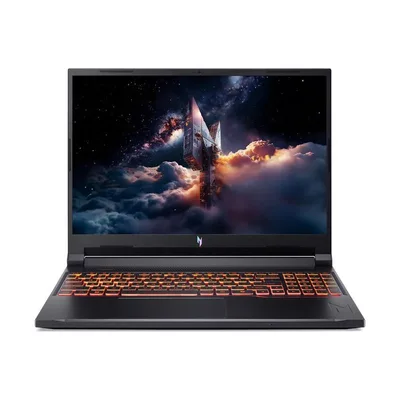
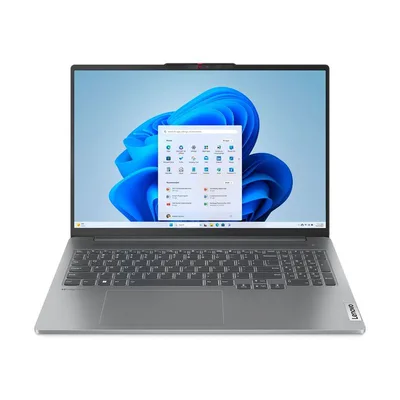
Key differences
- Gaming Nitro V16 AI wins
The Nitro V16 AI, with its RTX 5070, plays modern games at high settings, while the IdeaPad Pro 5, with its RTX 4050, plays modern games at 1080p.
- Screen IdeaPad Pro 5 wins
The IdeaPad Pro 5 has an OLED screen, with true blacks and rich colour, while the Nitro V16 AI has an IPS panel. Dark scenes in films look far deeper on the OLED.
- Weight IdeaPad Pro 5 wins
The IdeaPad Pro 5 weighs 1.94 kg, while the Nitro V16 AI weighs 2.44 kg. You'll feel the difference if it goes in your bag every day.
- Battery life IdeaPad Pro 5 wins
The IdeaPad Pro 5 is rated for 15 hours on a charge and the Nitro V16 AI for 7.5. Real use drains both faster than the rating, so read the gap as a rough guide.
- Storage Nitro V16 AI wins
The Nitro V16 AI has a 1 TB drive, while the IdeaPad Pro 5 has 512 GB. With the smaller drive, more of your photos and games end up in the cloud or on a USB drive.
- Upgrades Nitro V16 AI wins
Only the Nitro V16 AI lets you add memory later, up to 32 GB. On the IdeaPad Pro 5, what you buy is what you keep.
Which one should you choose?
Choose the Nitro V16 AI if…
- you want new games at higher settings
- you keep a big photo, music or game library on the laptop
- you want to add memory later
- you play fast games
Choose the IdeaPad Pro 5 if…
- you watch a lot of films or work with photos
- you want something easier to carry
- you work away from a socket for long stretches
- you're on video calls a lot
Full spec comparison
Both run Windows, so the choice comes down to the details. The real differences are gaming power, the type of screen and weight.
Green cells with a ✓ mark the better spec in that row. Tick "Show differences only" to hide the rows where they match.
Performance
| Spec | Acer Nitro V16 AI (ANV16-42) | Lenovo IdeaPad Pro 5 |
|---|---|---|
| Processor | AMD Ryzen 7 260 | Intel Core Ultra 7 155H |
| Graphics | NVIDIA GeForce RTX 5070 Laptop | NVIDIA GeForce RTX 4050 Laptop |
| Graphics memory | 8 GB | 6 GB |
| Graphics power (TGP) | 95 W | 80 W |
| AI engine (NPU) | 16 TOPS | 11 TOPS |
| Memory (RAM) | 16 GB | 16 GB |
| Memory type | DDR5-5600 | LPDDR5X-7467 |
| Maximum memory | 32 GB | 16 GB |
| Memory upgrades | Upgradeable (slots) | Soldered (not upgradeable) |
| Storage | 1 TB | 512 GB |
| Storage type | SSD | SSD |
| Storage interface | PCIe 4.0 NVMe M.2 | PCIe 4.0 x4 NVMe M.2 2242 |
| Storage slots | — | 2 |
Screen
The Nitro V16 AI has the smoother screen, 180Hz against 120Hz, so fast games look smoother and feel more responsive. The Nitro V16 AI has a matte screen, which cuts reflections from windows and lights. The IdeaPad Pro 5 has a glossy one, which reflects more, though some people prefer the look.
| Spec | Acer Nitro V16 AI (ANV16-42) | Lenovo IdeaPad Pro 5 |
|---|---|---|
| Screen size | 16" | 16" |
| Resolution | Full HD+ (1920 x 1200) | Full HD+ (2048 x 1280) |
| Aspect ratio | 16:10 | 16:10 |
| Panel | IPS | OLED |
| Refresh rate | 180 Hz | 120 Hz |
| Brightness | — | 400 nits |
| Colour range | 45% NTSC | 100% DCI-P3 |
| HDR | — | DisplayHDR True Black 500 |
| Finish | Matte | Glossy |
| Touchscreen | No | No |
Battery and size
| Spec | Acer Nitro V16 AI (ANV16-42) | Lenovo IdeaPad Pro 5 |
|---|---|---|
| Battery life (maker claim) | Up to 7.5 hours | Up to 15 hours |
| Battery capacity | 76 Wh | 84 Wh |
| Charger | 135 W | 170 W |
| Charges via | — | Slim Tip |
| Fast charging | — | Rapid Charge Express: 3 hours runtime from 15 minutes |
| Weight | 2.44 kg | 1.94 kg |
| Dimensions | 360 x 275.6 x 24.5 mm | 356 x 251 x 17.5 mm |
| Materials | — | aluminium top and bottom |
| Durability | — | MIL-STD-810H (21 tests) |
| Colour | Black | Arctic Grey |
| Colours available | — | Arctic Grey |
Ports and wireless
Of the two, only the Nitro V16 AI has Ethernet, so you can plug into a wired network.
| Spec | Acer Nitro V16 AI (ANV16-42) | Lenovo IdeaPad Pro 5 |
|---|---|---|
| Ports | 1x USB-C (USB4, DisplayPort, charging), 2x USB-A 3.2 Gen 2, 1x USB-A 3.2 Gen 1, 1x HDMI 2.1, 1x Gigabit Ethernet (RJ-45), 1x 3.5 mm combo audio, 1x microSD | 2x USB-A 3.2 Gen 1 (one Always On), 1x USB-C 3.2 Gen 2x2 (Power Delivery 3.0, DisplayPort 2.1), 1x Thunderbolt 4 / USB4 40Gbps (Power Delivery 3.0, DisplayPort 2.1), 1x HDMI 2.1 (up to 4K/60Hz), 1x 3.5 mm audio, 1x SD card reader |
| Thunderbolt / USB4 | USB4 | Thunderbolt 4 / USB4 40Gbps |
| External displays (max) | — | 3 |
| Card reader | microSD | SD |
| Ethernet | Gigabit Ethernet (RJ-45) | None |
| Wi-Fi | Wi-Fi 6E | Wi-Fi 6E |
| Bluetooth | Bluetooth 5.3 | Bluetooth 5.2 |
| Mobile data | None | None |
Features
The IdeaPad Pro 5 has the sharper webcam, so you look clearer on video calls.
| Spec | Acer Nitro V16 AI (ANV16-42) | Lenovo IdeaPad Pro 5 |
|---|---|---|
| Webcam | 720p | 1080p + IR |
| Webcam privacy | — | physical shutter |
| Backlit keyboard | Yes | Yes |
| Keyboard | Amber backlight, Caps Lock indicator, microphone mute indicator | UK English, backlit, numeric keypad |
| Login | — | Face |
| Number pad | Yes | Yes |
| Touchpad | Microsoft Precision Touchpad | glass, 80 x 135 mm |
| Speakers | 2 speakers | 2x 2 W, Dolby Atmos |
| Microphones | built-in microphone | dual-array |
| Pen | No | No |
| Security | Kensington lock slot, Microsoft Pluton (firmware TPM), BIOS passwords (user, supervisor) | firmware TPM 2.0, face recognition |
Software and model
| Spec | Acer Nitro V16 AI (ANV16-42) | Lenovo IdeaPad Pro 5 |
|---|---|---|
| Operating system | Windows 11 Home | Windows 11 Home |
| Model number | NH.QYYEK.006 | 83D40040UK |
| Released | 2025 | 2024 |