


Apple MacBook Pro 16 (M5 Pro) vs ASUS ProArt P16 (H7606)
The biggest choice here is the system: the MacBook Pro 16 runs macOS, while the ProArt P16 runs Windows. Beyond that, the ProArt P16 is the better choice for most people. It plays games far better, it's a little lighter and it has USB-A. The MacBook Pro 16 makes more sense if you keep lots of apps and tabs open.
We earn a commission from qualifying Amazon purchases made through our links, at no extra cost to you. This never affects our specs. How we make money.
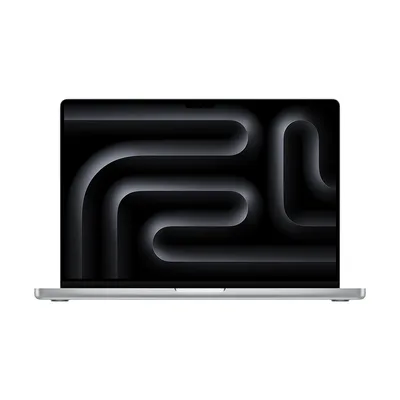
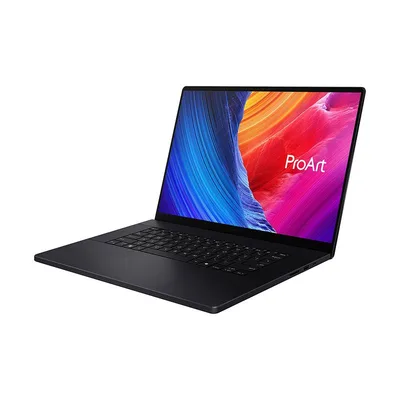
Key differences
- System Depends on you
The MacBook Pro 16 runs macOS, while the ProArt P16 runs Windows. A Mac suits iPhone owners and creative apps, while Windows runs nearly every program and game.
- Gaming ProArt P16 wins
The ProArt P16, with its RTX 5070, plays modern games at high settings, while the MacBook Pro 16 manages light and older games.
- Weight ProArt P16 wins
The ProArt P16 weighs 1.85 kg and the MacBook Pro 16 2.14 kg, so the ProArt P16 is a little lighter to carry.
- Memory MacBook Pro 16 wins
The MacBook Pro 16 has 24 GB of memory, while the ProArt P16 has 16 GB. That helps when you keep many apps, tabs or big projects open. Neither can be upgraded later.
- Brightness MacBook Pro 16 wins
The MacBook Pro 16 has the brighter screen, 1000 nits against 500, so it's easier to read near a window or on a train.
- Pen ProArt P16 wins
Just the ProArt P16 works with a pen, so you can write notes or sketch straight on the screen.
Which one should you choose?
Choose the MacBook Pro 16 if…
- you use an iPhone and want everything to work together
- you keep lots of apps and tabs open
- you often work near a window or outdoors
- you read or write a lot on screen
Choose the ProArt P16 if…
- you need Windows programs or want to play PC games
- you want to play new games too
- you want something easier to carry
- you want to sketch or mark up documents with a pen
Full spec comparison
These two are quite different laptops. The real differences are the operating system, gaming power and weight.
Green cells with a ✓ mark the better spec in that row. Tick "Show differences only" to hide the rows where they match.
Performance
| Spec | Apple MacBook Pro 16 (M5 Pro) | ASUS ProArt P16 (H7606) |
|---|---|---|
| Processor | Apple M5 Pro (18-core CPU) | AMD Ryzen AI 9 465 |
| Graphics | Apple M5 Pro 20-core GPU | NVIDIA GeForce RTX 5070 Laptop |
| Graphics memory | — | 8 GB |
| AI engine (NPU) | — | 50 TOPS |
| Memory (RAM) | 24 GB | 16 GB |
| Memory type | unified memory (307 GB/s bandwidth) | LPDDR5X-7500 |
| Maximum memory | 24 GB | 16 GB |
| Memory upgrades | Soldered (not upgradeable) | Soldered (not upgradeable) |
| Storage | 1 TB | 1 TB |
| Storage type | SSD | SSD |
| Storage interface | — | PCIe 4.0 NVMe M.2 2280 |
| Storage slots | — | 2 |
Screen
Only the ProArt P16 has a touchscreen, handy for scrolling, signing documents and quick taps. The MacBook Pro 16 has a slightly sharper screen, so text looks crisper and you can fit more on screen comfortably.
| Spec | Apple MacBook Pro 16 (M5 Pro) | ASUS ProArt P16 (H7606) |
|---|---|---|
| Screen size | 16.2" | 16" |
| Resolution | 3K (3456 x 2234) | 3K (2880 x 1800) |
| Aspect ratio | 16:10 | 16:10 |
| Panel | Mini-LED | OLED |
| Refresh rate | 120 Hz | 120 Hz |
| Variable refresh (VRR) | Yes | — |
| Brightness | 1,000 nits | 500 nits |
| Colour range | Wide colour (P3) | 100% DCI-P3 |
| HDR | XDR; Dolby Vision, HDR10+/HDR10 and HLG | VESA CERTIFIED Display HDR True Black 500 |
| Touchscreen | No | Yes |
| Pen standard | — | MPP 2.0 |
Battery and size
| Spec | Apple MacBook Pro 16 (M5 Pro) | ASUS ProArt P16 (H7606) |
|---|---|---|
| Battery life (maker claim) | Up to 24 hours | — |
| Battery capacity | 100 Wh | 90 Wh |
| Charger | 140 W | 200 W |
| Charges via | MagSafe 3 or USB-C | DC-in (rectangular barrel); USB-C PD also supported |
| Fast charging | Fast-charge capable with 140W or higher USB PD power source | — |
| Weight | 2.14 kg | 1.85 kg |
| Dimensions | 355.7 x 248.1 x 16.8 mm | 354.9 x 246.9 x 14.9-17.3 mm |
| Materials | 100% recycled aluminium enclosure | — |
| Durability | — | US MIL-STD 810H |
| Colour | Space Black | Nano Black |
| Colours available | Space Black, Silver | Nano Black |
Ports and wireless
Of the two, only the ProArt P16 has USB-A, so you can plug in USB sticks and older accessories without an adapter.
| Spec | Apple MacBook Pro 16 (M5 Pro) | ASUS ProArt P16 (H7606) |
|---|---|---|
| Ports | 3x Thunderbolt 5 (USB-C, charging, DisplayPort, USB4 up to 120Gb/s), 1x HDMI, 1x SDXC card slot, 1x MagSafe 3, 1x 3.5 mm headphone | 2x USB 3.2 Gen 2 Type-A (10Gbps), 1x USB4 Gen 3 Type-C (40Gbps, display, power delivery), 1x USB 3.2 Gen 2 Type-C (10Gbps, display, power delivery), 1x HDMI 2.1 FRL, 1x 3.5 mm combo audio, 1x SD Express 7.0 card reader, 1x DC-in |
| Thunderbolt / USB4 | Thunderbolt 5 / USB4 up to 120Gb/s | USB4 40Gbps |
| External displays (max) | 3 | — |
| Card reader | SDXC | SD Express 7.0 |
| Ethernet | None | None |
| Wi-Fi | Wi-Fi 7 | Wi-Fi 7 |
| Wi-Fi card | Apple N1 | — |
| Bluetooth | Bluetooth 6 | Bluetooth 5.4 |
| Mobile data | None | None |
Features
| Spec | Apple MacBook Pro 16 (M5 Pro) | ASUS ProArt P16 (H7606) |
|---|---|---|
| Webcam | 12MP Center Stage; 1080p video | 1080p + IR |
| Backlit keyboard | Yes | Yes |
| Keyboard | Backlit Magic Keyboard; 79-key ISO layout; 12 full-height function keys; ambient light sensor | Backlit chiclet, 1.7 mm key travel, Copilot key |
| Login | Fingerprint | Face |
| Number pad | No | No |
| Touchpad | Force Touch trackpad | Precision touchpad with DialPad |
| Speakers | high-fidelity six-speaker system with force-cancelling woofers | 6-speaker system, Dolby Atmos |
| Microphones | studio-quality three-mic array with directional beamforming | array microphone |
| Pen | No | Supported (sold separately) |
| Security | Touch ID | Firmware TPM, Microsoft Pluton, IR webcam with Windows Hello |
Software and model
| Spec | Apple MacBook Pro 16 (M5 Pro) | ASUS ProArt P16 (H7606) |
|---|---|---|
| Operating system | macOS | Windows 11 Home |
| Model number | — | H7606GP-SR011W |
| Released | 2026 | 2026 |