


Microsoft Surface Go 2 vs HP Pavilion x360 14 (2022, older gen)
Neither is clearly ahead, so go by what you need. The Surface Go 2 suits you if you read or write a lot on screen, the Pavilion x360 14 if you want everyday work to feel quicker.
We earn a commission from qualifying Amazon purchases made through our links, at no extra cost to you. This never affects our specs. How we make money.
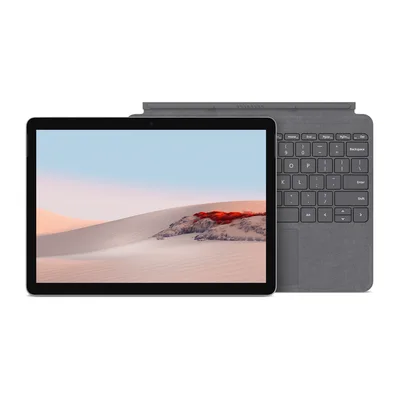
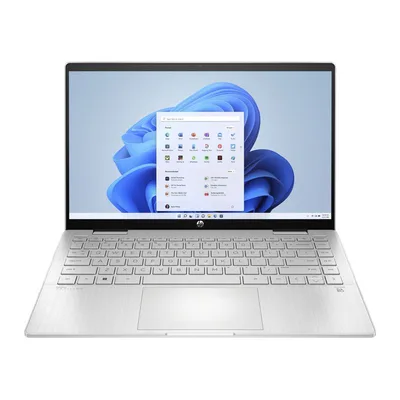
Key differences
- Processor Pavilion x360 14 wins
The Pavilion x360 14 has a faster class of processor. It keeps up better with several apps at once, while the Surface Go 2 suits one task at a time.
- Sharpness Surface Go 2 wins
The Surface Go 2 has a noticeably sharper screen, so text looks crisper and you can fit more on screen comfortably.
- Weight Surface Go 2 wins
The Surface Go 2 weighs 0.79 kg, while the Pavilion x360 14 weighs 1.52 kg. You'll feel the difference if it goes in your bag every day.
- Storage Pavilion x360 14 wins
The Pavilion x360 14 has a 512 GB drive, while the Surface Go 2 has 128 GB. The bigger drive holds far more photos, music and games before you have to clear space.
- Battery life Surface Go 2 wins
The Surface Go 2 is rated for 10 hours on a charge and the Pavilion x360 14 for 8. Real use drains both faster than the rating, so read the gap as a rough guide.
- Screen size Depends on you
The Pavilion x360 14 has a 14-inch screen, the Surface Go 2 a 10.5-inch one. The bigger screen is easier for spreadsheets, split-screen work and films, and the smaller one is easier to carry.
Which one should you choose?
Choose the Surface Go 2 if…
- you read or write a lot on screen
- you want something easier to carry
- you work away from a socket for long stretches
Choose the Pavilion x360 14 if…
- you want everyday work to feel quicker
- you keep a big photo, music or game library on the laptop
- you want a bigger screen to work on
- you connect to a TV or monitor
Full spec comparison
Both run Windows, so they're aimed at much the same people. The real differences are processor power, sharpness and weight.
Green cells with a ✓ mark the better spec in that row. Tick "Show differences only" to hide the rows where they match.
Performance
| Spec | Microsoft Surface Go 2 | HP Pavilion x360 14 (2022, older gen) |
|---|---|---|
| Processor | Intel Core m3-8100Y | Intel Core i5-1235U |
| Graphics | Intel UHD Graphics 615 | Intel Iris Xe Graphics |
| Memory (RAM) | 8 GB | 8 GB |
| Memory type | — | DDR4-3200 |
| Maximum memory | — | 8 GB |
| Memory upgrades | — | Soldered (not upgradeable) |
| Storage | 128 GB | 512 GB |
| Storage type | SSD | SSD |
| Storage interface | — | PCIe NVMe M.2 |
Screen
| Spec | Microsoft Surface Go 2 | HP Pavilion x360 14 (2022, older gen) |
|---|---|---|
| Screen size | 10.5" | 14" |
| Resolution | Full HD+ (1920 x 1280) | Full HD (1920 x 1080) |
| Aspect ratio | 3:2 | 16:9 |
| Panel | LCD | IPS |
| Refresh rate | 60 Hz | 60 Hz |
| Brightness | — | 250 nits |
| Colour range | — | 45% NTSC |
| HDR | None | None |
| Touchscreen | Yes | Yes |
Battery and size
| Spec | Microsoft Surface Go 2 | HP Pavilion x360 14 (2022, older gen) |
|---|---|---|
| Battery life (maker claim) | Up to 10 hours | Up to 8 hours |
| Battery capacity | — | 43 Wh |
| Charger | 24 W | 45 W |
| Charges via | Surface Connect | AC smart pin (barrel); USB-C also lists USB Power Delivery |
| Fast charging | — | 50% in approx. 45 minutes |
| Weight | 0.789 kg | 1.52 kg |
| Dimensions | 245 x 175 x 8.3 mm | 322 x 210 x 18.8-19.8 mm |
| Materials | Magnesium | Natural silver aluminium keyboard deck (anodised finish); ocean-bound plastic in base, bezel and sideband |
| Hinge | — | 360-degree convertible |
| Colour | Platinum | Silver |
| Colours available | Platinum | — |
Ports and wireless
Only the Pavilion x360 14 has HDMI and USB-A, so you can connect a TV or monitor and plug in USB sticks and older accessories without an adapter.
| Spec | Microsoft Surface Go 2 | HP Pavilion x360 14 (2022, older gen) |
|---|---|---|
| Ports | 1x USB-C (charging), 1x Surface Connect (charging), 1x 3.5 mm headphone jack, 1x microSDXC (UHS-I), 1x Surface Type Cover port | 1x USB-C 10 Gbps (USB Power Delivery, DisplayPort 1.4, HP Sleep and Charge), 2x USB-A 5 Gbps, 1x HDMI 2.1, 1x 3.5 mm headphone/microphone combo, 1x microSD, 1x AC smart pin (power) |
| Thunderbolt / USB4 | None | None |
| Card reader | microSDXC (UHS-I) | microSD |
| Ethernet | None | None |
| Wi-Fi | Wi-Fi 6 | Wi-Fi 6 |
| Bluetooth | Bluetooth 5.0 | Bluetooth 5.0 |
| Mobile data | None | None |
Features
Of the two, only the Pavilion x360 14 has a backlit keyboard, which makes typing in a dim room or on a night train much easier.
| Spec | Microsoft Surface Go 2 | HP Pavilion x360 14 (2022, older gen) |
|---|---|---|
| Webcam | 1080p + IR | 5MP |
| Webcam privacy | None | physical shutter |
| Backlit keyboard | No | Yes |
| Keyboard | — | Full-size, backlit, natural silver |
| Login | Face | Fingerprint |
| Number pad | No | — |
| Touchpad | — | HP Imagepad with multi-touch gesture support |
| Speakers | 2 W stereo speakers, Dolby Audio | Audio by B&O, dual speakers; HP Audio Boost |
| Microphones | Dual Studio Mics | integrated dual-array digital microphones |
| Pen | Supported (sold separately) | — |
| Security | Firmware TPM, Windows Hello face sign-in | HP BIOS Protection, Fingerprint reader |
Software and model
| Spec | Microsoft Surface Go 2 | HP Pavilion x360 14 (2022, older gen) |
|---|---|---|
| Operating system | Windows 11 Pro | Windows 11 Home |
| Update promise | None | — |
| Released | 2020 | 2022 |