


HP Pavilion x360 14 (2022, older gen) vs Lenovo ThinkPad X1 2-in-1 (Gen 9)
The ThinkPad X1 2-in-1 is the better choice for most people. It has more memory, its battery lasts longer and its screen is brighter. Choose the Pavilion x360 14 instead if you copy photos from a camera.
We earn a commission from qualifying Amazon purchases made through our links, at no extra cost to you. This never affects our specs. How we make money.
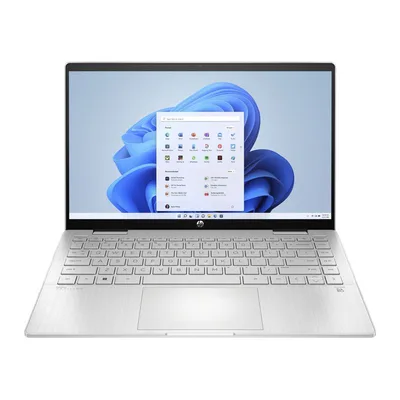
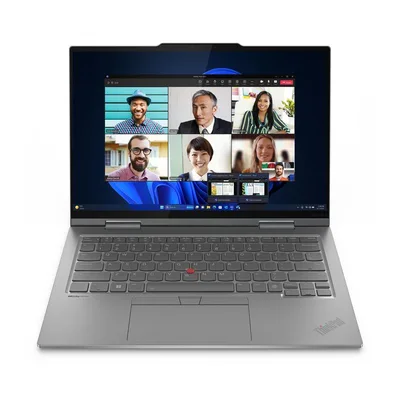
Key differences
- Memory ThinkPad X1 2-in-1 wins
The ThinkPad X1 2-in-1 has 32 GB of memory, while the Pavilion x360 14 has 8 GB. That helps when you keep many apps, tabs or big projects open. Neither can be upgraded later.
- Battery life ThinkPad X1 2-in-1 wins
The ThinkPad X1 2-in-1 is rated for 23.2 hours on a charge and the Pavilion x360 14 for 8. Makers measure these in light use, so real days come out shorter on both.
- Brightness ThinkPad X1 2-in-1 wins
The ThinkPad X1 2-in-1 has the brighter screen, 400 nits against 250, so it's easier to read near a window or on a train.
- Ports Depends on you
Each has ports the other lacks: the Pavilion x360 14 has a card reader, so you can copy photos straight from a camera card, and the ThinkPad X1 2-in-1 has Thunderbolt or USB4, so you can use 40 Gbps docks that run several screens and fast external drives.
- Screen shape ThinkPad X1 2-in-1 wins
The ThinkPad X1 2-in-1 has a slightly taller screen (16:10 against 16:9), so you see more of a document or web page without scrolling.
- Wi-Fi ThinkPad X1 2-in-1 wins
The ThinkPad X1 2-in-1 has Wi-Fi 6E, the Pavilion x360 14 Wi-Fi 6. The newer standard gets more out of a modern router.
Which one should you choose?
Choose the Pavilion x360 14 if…
- you copy photos from a camera
Choose the ThinkPad X1 2-in-1 if…
- you keep lots of apps and tabs open
- you work away from a socket for long stretches
- you often work near a window or outdoors
- you use a dock or fast external drives
Full spec comparison
Both run Windows and fold into a tablet, so the choice comes down to the details. The real differences are memory, battery life and brightness.
Green cells with a ✓ mark the better spec in that row. Tick "Show differences only" to hide the rows where they match.
Performance
| Spec | HP Pavilion x360 14 (2022, older gen) | Lenovo ThinkPad X1 2-in-1 (Gen 9) |
|---|---|---|
| Processor | Intel Core i5-1235U | Intel Core Ultra 5 135U |
| Graphics | Intel Iris Xe Graphics | Intel Graphics |
| AI engine (NPU) | — | 11 TOPS |
| Memory (RAM) | 8 GB | 32 GB |
| Memory type | DDR4-3200 | LPDDR5X-6400 |
| Maximum memory | 8 GB | 32 GB |
| Memory upgrades | Soldered (not upgradeable) | Soldered (not upgradeable) |
| Storage | 512 GB | 512 GB |
| Storage type | SSD | SSD |
| Storage interface | PCIe NVMe M.2 | PCIe 4.0 x4 NVMe M.2 2280 |
| Storage slots | — | 1 |
Screen
| Spec | HP Pavilion x360 14 (2022, older gen) | Lenovo ThinkPad X1 2-in-1 (Gen 9) |
|---|---|---|
| Screen size | 14" | 14" |
| Resolution | Full HD (1920 x 1080) | Full HD+ (1920 x 1200) |
| Aspect ratio | 16:9 | 16:10 |
| Panel | IPS | IPS |
| Refresh rate | 60 Hz | 60 Hz |
| Brightness | 250 nits | 400 nits |
| Colour range | 45% NTSC | 100% sRGB |
| HDR | None | None |
| Finish | — | Anti-reflective |
| Touchscreen | Yes | Yes |
| Pen standard | — | Lenovo Slim Pen |
Battery and size
The ThinkPad X1 2-in-1 weighs 1.35 kg and the Pavilion x360 14 1.52 kg, so there's little in it.
| Spec | HP Pavilion x360 14 (2022, older gen) | Lenovo ThinkPad X1 2-in-1 (Gen 9) |
|---|---|---|
| Battery life (maker claim) | Up to 8 hours | Up to 23.2 hours |
| Battery capacity | 43 Wh | 57 Wh |
| Charger | 45 W | 65 W |
| Charges via | AC smart pin (barrel); USB-C also lists USB Power Delivery | USB-C |
| Fast charging | 50% in approx. 45 minutes | Rapid Charge: up to 80% in 1 hour |
| Weight | 1.52 kg | 1.35 kg |
| Dimensions | 322 x 210 x 18.8-19.8 mm | 312.80 x 217.65 x 15.49 mm |
| Materials | Natural silver aluminium keyboard deck (anodised finish); ocean-bound plastic in base, bezel and sideband | aluminium top and bottom |
| Durability | — | MIL-STD-810H |
| Hinge | 360-degree convertible | 360-degree convertible |
| Colour | Silver | Grey |
| Colours available | — | Grey |
Ports and wireless
| Spec | HP Pavilion x360 14 (2022, older gen) | Lenovo ThinkPad X1 2-in-1 (Gen 9) |
|---|---|---|
| Ports | 1x USB-C 10 Gbps (USB Power Delivery, DisplayPort 1.4, HP Sleep and Charge), 2x USB-A 5 Gbps, 1x HDMI 2.1, 1x 3.5 mm headphone/microphone combo, 1x microSD, 1x AC smart pin (power) | 2x USB-A 3.2 Gen 1 (one Always On), 2x Thunderbolt 4 / USB4 40Gbps (Power Delivery 3.0, DisplayPort 2.1), 1x HDMI 2.1 (up to 4K/60Hz), 1x 3.5 mm audio |
| Thunderbolt / USB4 | None | Thunderbolt 4 / USB4 40Gbps |
| External displays (max) | — | 3 |
| Card reader | microSD | None |
| Ethernet | None | None |
| Wi-Fi | Wi-Fi 6 | Wi-Fi 6E |
| Wi-Fi card | — | Intel Wi-Fi 6E AX211 |
| Bluetooth | Bluetooth 5.0 | Bluetooth 5.3 |
| Mobile data | None | None |
Features
| Spec | HP Pavilion x360 14 (2022, older gen) | Lenovo ThinkPad X1 2-in-1 (Gen 9) |
|---|---|---|
| Webcam | 5MP | 1080p + IR |
| Webcam privacy | physical shutter | physical shutter |
| Backlit keyboard | Yes | Yes |
| Keyboard | Full-size, backlit, natural silver | UK English, backlit, spill-resistant |
| Login | Fingerprint | Fingerprint, Face |
| Number pad | — | No |
| Touchpad | HP Imagepad with multi-touch gesture support | Trackpad |
| Speakers | Audio by B&O, dual speakers; HP Audio Boost | 2x 2 W, Dolby Atmos |
| Microphones | integrated dual-array digital microphones | dual-array |
| Pen | — | Supported (sold separately) |
| Security | HP BIOS Protection, Fingerprint reader | discrete TPM 2.0, Kensington Nano Security Slot, fingerprint, face recognition |
Software and model
| Spec | HP Pavilion x360 14 (2022, older gen) | Lenovo ThinkPad X1 2-in-1 (Gen 9) |
|---|---|---|
| Operating system | Windows 11 Home | Windows 11 Pro |
| Model number | — | 21KE0080UK |
| Released | 2022 | 2024 |