


ASUS Zenbook 14 OLED (UX3405CA) vs Lenovo IdeaPad Slim 3 (14ARP10)
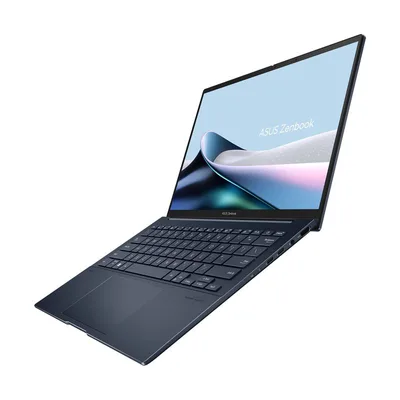
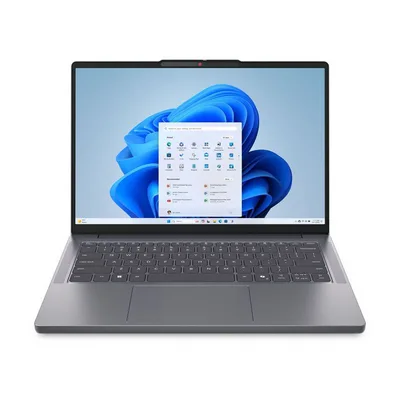
The Zenbook 14 OLED is the better choice for most people. It has an OLED screen, it has more storage and its screen is brighter. Choose the IdeaPad Slim 3 instead if you copy photos from a camera.
We earn a commission from qualifying Amazon purchases made through our links, at no extra cost to you. This never affects our specs. How we make money.
Key differences
- Screen Zenbook 14 OLED wins
The Zenbook 14 OLED has an OLED screen, with true blacks and rich colour, while the IdeaPad Slim 3 has an IPS panel. Dark scenes in films look far deeper on the OLED.
- Storage Zenbook 14 OLED wins
The Zenbook 14 OLED has a 1 TB drive, while the IdeaPad Slim 3 has 512 GB. The bigger drive holds far more photos, music and games before you have to clear space.
- Brightness Zenbook 14 OLED wins
The Zenbook 14 OLED has the brighter screen, 400 nits against 300, so it's easier to read near a window or on a train.
- Ports Depends on you
Each has ports the other lacks: the Zenbook 14 OLED has Thunderbolt or USB4, so you can use 40 Gbps docks that run several screens and fast external drives, and the IdeaPad Slim 3 has a card reader, so you can copy photos straight from a camera card.
- HDR Zenbook 14 OLED wins
The Zenbook 14 OLED has a screen with an HDR certificate, so films and games show brighter highlights and deeper shadows. The IdeaPad Slim 3 doesn't support HDR.
- Battery size Zenbook 14 OLED wins
The Zenbook 14 OLED has the bigger battery, 75 Wh against 60 Wh, so it should last longer between charges.
Which one should you choose?
Choose the Zenbook 14 OLED if…
- you watch a lot of films or work with photos
- you keep a big photo, music or game library on the laptop
- you often work near a window or outdoors
- you use a dock or fast external drives
Choose the IdeaPad Slim 3 if…
- you copy photos from a camera
- you work in bright rooms with lots of reflections
Full spec comparison
Both run Windows, so they suit similar buyers. The real differences are the screen and storage.
Green cells with a ✓ mark the better spec in that row. Tick "Show differences only" to hide the rows where they match.
Performance
| Spec | ASUS Zenbook 14 OLED (UX3405CA) | Lenovo IdeaPad Slim 3 (14ARP10) |
|---|---|---|
| Processor | Intel Core Ultra 7 255H | AMD Ryzen 7 170 |
| Graphics | Intel Arc 140T | AMD Radeon 680M |
| AI engine (NPU) | 13 TOPS | — |
| Memory (RAM) | 16 GB | 16 GB |
| Memory type | LPDDR5X | DDR5-4800 |
| Maximum memory | 16 GB | 16 GB |
| Memory upgrades | Soldered (not upgradeable) | Upgradeable (slots) |
| Storage | 1 TB | 512 GB |
| Storage type | SSD | SSD |
| Storage interface | PCIe 4.0 NVMe M.2 2280 | PCIe 4.0 x4 NVMe M.2 2242 |
| Storage slots | 1 | 2 |
Screen
Only the Zenbook 14 OLED has a touchscreen, handy for scrolling, signing documents and quick taps. The IdeaPad Slim 3 has a matte screen, which cuts reflections from windows and lights. The Zenbook 14 OLED has a glossy one, which reflects more, though some people prefer the look.
| Spec | ASUS Zenbook 14 OLED (UX3405CA) | Lenovo IdeaPad Slim 3 (14ARP10) |
|---|---|---|
| Screen size | 14" | 14" |
| Resolution | Full HD+ (1920 x 1200) | Full HD+ (1920 x 1200) |
| Aspect ratio | 16:10 | 16:10 |
| Panel | OLED | IPS |
| Refresh rate | 60 Hz | 60 Hz |
| Variable refresh (VRR) | No | No |
| Brightness | 400 nits | 300 nits |
| Colour range | 100% DCI-P3 | 45% NTSC |
| HDR | VESA DisplayHDR True Black 500 | None |
| Finish | Glossy | Matte |
| Touchscreen | Yes | No |
| Pen standard | MPP 2.0 | — |
Battery and size
The Zenbook 14 OLED weighs 1.28 kg and the IdeaPad Slim 3 1.43 kg, so there's little in it.
| Spec | ASUS Zenbook 14 OLED (UX3405CA) | Lenovo IdeaPad Slim 3 (14ARP10) |
|---|---|---|
| Battery life (maker claim) | — | Up to 18 hours |
| Battery capacity | 75 Wh | 60 Wh |
| Charger | 65 W | — |
| Charges via | USB-C | round tip / USB-C PD |
| Fast charging | — | 2 hours runtime from 15-minute charge (Rapid Charge Boost) |
| Weight | 1.28 kg | 1.43 kg |
| Dimensions | 312.4 x 220.1 x 14.9 mm | 314.4 x 222.1 x 17.9-18.9 mm |
| Materials | — | PC-ABS lid and base |
| Durability | US MIL-STD-810H | MIL-STD-810H |
| Colour | Ponder Blue | Luna Grey |
| Colours available | Ponder Blue, Jasper Gray, Foggy Silver | Cosmic Blue, Luna Grey |
Ports and wireless
| Spec | ASUS Zenbook 14 OLED (UX3405CA) | Lenovo IdeaPad Slim 3 (14ARP10) |
|---|---|---|
| Ports | 2x Thunderbolt 4 (USB-C, both support charging and DisplayPort, up to 40Gbps), 1x USB-A 3.2 Gen 1 (5Gbps), 1x HDMI 2.1 (TMDS), 1x 3.5 mm combo audio | 2x USB-A 5Gbps, 1x USB-C 5Gbps (USB PD 45-65W, DisplayPort 1.2), 1x HDMI 1.4, 1x 3.5 mm audio, 1x SD card reader, 1x round-tip power |
| Thunderbolt / USB4 | 2x Thunderbolt 4 (40 Gbps) | None |
| External displays (max) | — | 2 |
| Card reader | None | SD |
| Ethernet | None | None |
| Wi-Fi | Wi-Fi 7 | Wi-Fi 7 |
| Wi-Fi card | — | Wi-Fi 7 802.11be 2x2 M.2 card |
| Bluetooth | Bluetooth 5.4 | Bluetooth 5.4 |
| Mobile data | None | None |
Features
Just the Zenbook 14 OLED works with a pen, so you can write notes or sketch straight on the screen. Of the two, only the Zenbook 14 OLED has a backlit keyboard, which makes typing in a dim room or on a night train much easier.
| Spec | ASUS Zenbook 14 OLED (UX3405CA) | Lenovo IdeaPad Slim 3 (14ARP10) |
|---|---|---|
| Webcam | 1080p + IR | 1080p + IR |
| Webcam privacy | physical shutter | physical shutter |
| Backlit keyboard | Yes | No |
| Keyboard | backlit chiclet, 1.4 mm key travel, Copilot key | 6-row, 1.3 mm travel, Copilot key, non-backlit |
| Login | Face | Face |
| Number pad | No | No |
| Touchpad | precision touchpad | 75 x 120 mm Mylar Precision touchpad |
| Speakers | Harman Kardon stereo speakers | 2x 2W, Dolby Audio |
| Microphones | built-in array microphone | dual-array |
| Pen | Supported (sold separately) | No |
| Security | TPM 2.0, Windows Hello face recognition | Firmware TPM 2.0 |
Software and model
The IdeaPad Slim 3 comes in Windows S mode, so it only installs apps from the Microsoft Store until you switch S mode off. Switching is free but one-way. The Zenbook 14 OLED runs any Windows program from the start.
| Spec | ASUS Zenbook 14 OLED (UX3405CA) | Lenovo IdeaPad Slim 3 (14ARP10) |
|---|---|---|
| Operating system | Windows 11 Home | Windows 11 Home in S mode |
| Model number | UX3405CA-QL192W | 83K60080UK |
| Released | 2025 | 2025 |