


Microsoft Surface Laptop 13.8 (8th Edition) vs Lenovo IdeaPad Slim 3 (14ARP10)
For most people, the Surface Laptop 13.8 is the one to get. Its screen is brighter, smoother and sharper. Choose the IdeaPad Slim 3 instead if you connect to a TV or monitor.
We earn a commission from qualifying Amazon purchases made through our links, at no extra cost to you. This never affects our specs. How we make money.
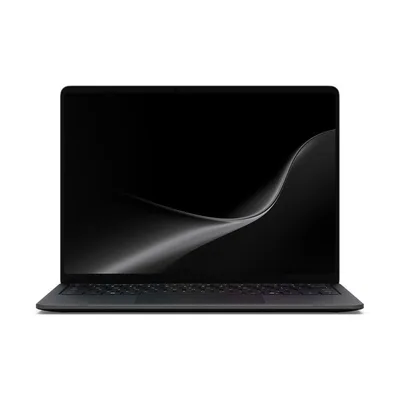
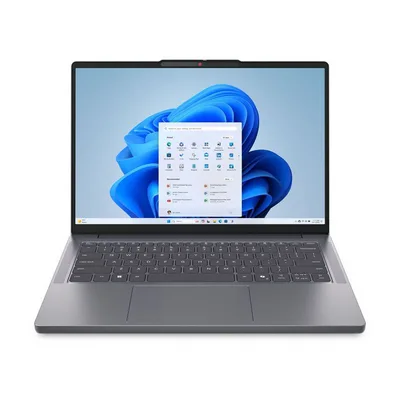
Key differences
- Brightness Surface Laptop 13.8 wins
The Surface Laptop 13.8 has the brighter screen, 600 nits against 300, so it's easier to read near a window or on a train.
- Ports Depends on you
Each has ports the other lacks: the Surface Laptop 13.8 has Thunderbolt or USB4, so you can use 40 Gbps docks that run several screens and fast external drives, and the IdeaPad Slim 3 has HDMI and a card reader, so you can connect a TV or monitor and copy photos straight from a camera card.
- Smoothness Surface Laptop 13.8 wins
The Surface Laptop 13.8 has the smoother screen, 120Hz against 60Hz, so scrolling and moving windows look smoother.
- Touchscreen Surface Laptop 13.8 wins
Only the Surface Laptop 13.8 has a touchscreen, handy for scrolling, signing documents and quick taps.
- Keyboard Surface Laptop 13.8 wins
Of the two, only the Surface Laptop 13.8 has a backlit keyboard, which makes typing in a dim room or on a night train much easier.
- S mode Surface Laptop 13.8 wins
The IdeaPad Slim 3 comes in Windows S mode, so it only installs apps from the Microsoft Store until you switch S mode off. Switching is free but one-way. The Surface Laptop 13.8 runs any Windows program from the start.
Which one should you choose?
Choose the Surface Laptop 13.8 if…
- you often work near a window or outdoors
- you use a dock or fast external drives
- you want smoother scrolling
- you like to tap and scroll on the screen
Choose the IdeaPad Slim 3 if…
- you connect to a TV or monitor
Full spec comparison
Both run Windows, so they're aimed at much the same people. The real differences are the screen and ports.
Green cells with a ✓ mark the better spec in that row. Tick "Show differences only" to hide the rows where they match.
Performance
| Spec | Microsoft Surface Laptop 13.8 (8th Edition) | Lenovo IdeaPad Slim 3 (14ARP10) |
|---|---|---|
| Processor | Snapdragon X2 Plus (10 Core) | AMD Ryzen 7 170 |
| Graphics | Qualcomm Adreno GPU | AMD Radeon 680M |
| AI engine (NPU) | 80 TOPS | — |
| Memory (RAM) | 16 GB | 16 GB |
| Memory type | LPDDR5x | DDR5-4800 |
| Maximum memory | 16 GB | 16 GB |
| Memory upgrades | Soldered (not upgradeable) | Upgradeable (slots) |
| Storage | 512 GB | 512 GB |
| Storage type | SSD | SSD |
| Storage interface | Removable Gen 4 SSD | PCIe 4.0 x4 NVMe M.2 2242 |
| Storage slots | — | 2 |
Screen
The Surface Laptop 13.8 has a slightly sharper screen, so text looks crisper and you can fit more on screen comfortably.
| Spec | Microsoft Surface Laptop 13.8 (8th Edition) | Lenovo IdeaPad Slim 3 (14ARP10) |
|---|---|---|
| Screen size | 13.8" | 14" |
| Resolution | 2K (2304 x 1536) | Full HD+ (1920 x 1200) |
| Aspect ratio | 3:2 | 16:10 |
| Panel | LCD | IPS |
| Refresh rate | 120 Hz | 60 Hz |
| Variable refresh (VRR) | — | No |
| Brightness | 600 nits | 300 nits |
| Colour range | — | 45% NTSC |
| HDR | HDR, 600 nits peak; Dolby Vision IQ support | None |
| Finish | — | Matte |
| Touchscreen | Yes | No |
Battery and size
The Surface Laptop 13.8 is rated for 20 hours on a charge and the IdeaPad Slim 3 for 18. Real use drains both faster than the rating, so read the gap as a rough guide.
| Spec | Microsoft Surface Laptop 13.8 (8th Edition) | Lenovo IdeaPad Slim 3 (14ARP10) |
|---|---|---|
| Battery life (maker claim) | Up to 20 hours | Up to 18 hours |
| Battery capacity | 54 Wh | 60 Wh |
| Charges via | USB-C (USB4) and Surface Connect | round tip / USB-C PD |
| Fast charging | Fast charging supported with min. 60W USB-C PD charger or 65W Surface Power Supply (sold separately); no percentage/time claim | 2 hours runtime from 15-minute charge (Rapid Charge Boost) |
| Weight | 1.36 kg | 1.43 kg |
| Dimensions | 301 x 220 x 17.5 mm | 314.4 x 222.1 x 17.9-18.9 mm |
| Materials | Recycled aluminium alloy enclosure (A cover and C bucket) | PC-ABS lid and base |
| Durability | — | MIL-STD-810H |
| Colour | Black | Luna Grey |
| Colours available | Black, Platinum | Cosmic Blue, Luna Grey |
Ports and wireless
| Spec | Microsoft Surface Laptop 13.8 (8th Edition) | Lenovo IdeaPad Slim 3 (14ARP10) |
|---|---|---|
| Ports | 2x USB-C / USB4 (charging, data, DisplayPort 2.1), 1x USB-A 3.2, 1x 3.5 mm audio, 1x Surface Connect (charging) | 2x USB-A 5Gbps, 1x USB-C 5Gbps (USB PD 45-65W, DisplayPort 1.2), 1x HDMI 1.4, 1x 3.5 mm audio, 1x SD card reader, 1x round-tip power |
| Thunderbolt / USB4 | USB4 | None |
| External displays (max) | 3 | 2 |
| Card reader | None | SD |
| Ethernet | None | None |
| Wi-Fi | Wi-Fi 7 | Wi-Fi 7 |
| Wi-Fi card | — | Wi-Fi 7 802.11be 2x2 M.2 card |
| Bluetooth | Bluetooth 5.4 | Bluetooth 5.4 |
| Mobile data | None | None |
Features
| Spec | Microsoft Surface Laptop 13.8 (8th Edition) | Lenovo IdeaPad Slim 3 (14ARP10) |
|---|---|---|
| Webcam | 1080p | 1080p + IR |
| Webcam privacy | — | physical shutter |
| Backlit keyboard | Yes | No |
| Keyboard | Automatic backlight, Copilot key | 6-row, 1.3 mm travel, Copilot key, non-backlit |
| Login | Face | Face |
| Number pad | No | No |
| Touchpad | Precision haptic touchpad with advanced haptics and adaptive touch mode | 75 x 120 mm Mylar Precision touchpad |
| Speakers | Omnisonic speakers with Dolby Atmos | 2x 2W, Dolby Audio |
| Microphones | Dual Studio Mics with voice focus | dual-array |
| Pen | No | No |
| Security | TPM 2.0, Microsoft Pluton security processor | Firmware TPM 2.0 |
Software and model
| Spec | Microsoft Surface Laptop 13.8 (8th Edition) | Lenovo IdeaPad Slim 3 (14ARP10) |
|---|---|---|
| Operating system | Windows 11 Home | Windows 11 Home in S mode |
| Model number | EP2-60925 | 83K60080UK |
| Released | 2026 | 2025 |