


HP EliteBook x360 1040 G8 vs HP ProBook x360 435 G8
The EliteBook x360 1040 G8 is the better choice for most people. It has more memory and it has a bigger battery. The ProBook x360 435 G8 makes more sense if you want to add memory later.
We earn a commission from qualifying Amazon purchases made through our links, at no extra cost to you. This never affects our specs. How we make money.
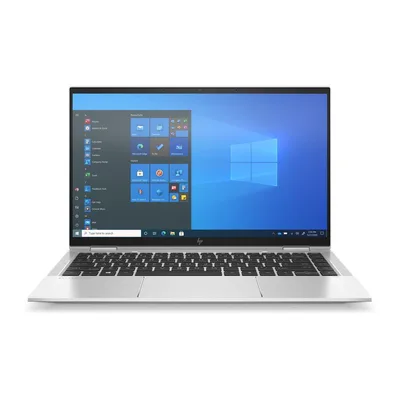
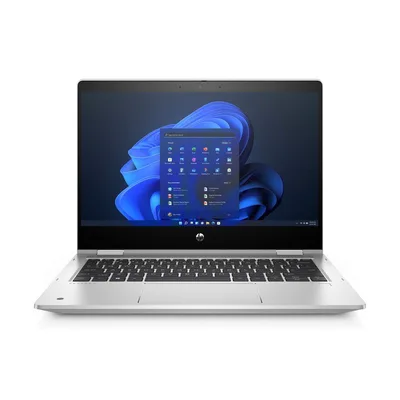
Key differences
- Memory EliteBook x360 1040 G8 wins
The EliteBook x360 1040 G8 has 32 GB of memory, while the ProBook x360 435 G8 has 16 GB. That helps when you keep many apps, tabs or big projects open.
- Upgrades ProBook x360 435 G8 wins
Only the ProBook x360 435 G8 lets you add memory later, up to 32 GB. On the EliteBook x360 1040 G8, what you buy is what you keep.
- Ports Depends on you
Each has ports the other lacks: the EliteBook x360 1040 G8 has Thunderbolt or USB4, so you can use 40 Gbps docks that run several screens and fast external drives, and the ProBook x360 435 G8 has a card reader, so you can copy photos straight from a camera card.
- Battery size EliteBook x360 1040 G8 wins
The EliteBook x360 1040 G8 has the bigger battery, 54 Wh against 45 Wh, so it should last longer between charges.
- Screen finish Depends on you
The EliteBook x360 1040 G8 has a matte screen, which cuts reflections from windows and lights. The ProBook x360 435 G8 has a glossy one, which reflects more, though some people prefer the look.
- Wi-Fi EliteBook x360 1040 G8 wins
The EliteBook x360 1040 G8 has Wi-Fi 6, the ProBook x360 435 G8 Wi-Fi 5. With a newer router at home, the newer standard is quicker and copes better with busy networks.
Which one should you choose?
Choose the EliteBook x360 1040 G8 if…
- you keep lots of apps and tabs open
- you use a dock or fast external drives
- you work away from a socket for long stretches
- you work in bright rooms with lots of reflections
Choose the ProBook x360 435 G8 if…
- you want to add memory later
- you copy photos from a camera
Full spec comparison
Both run Windows and fold into a tablet, so the choice comes down to the details. The real differences are memory, upgrades and ports.
Green cells with a ✓ mark the better spec in that row. Tick "Show differences only" to hide the rows where they match.
Performance
| Spec | HP EliteBook x360 1040 G8 | HP ProBook x360 435 G8 |
|---|---|---|
| Processor | Intel Core i7-1185G7 | AMD Ryzen 7 PRO 5850U |
| Graphics | Intel Iris Xe Graphics | AMD Radeon Graphics |
| Memory (RAM) | 32 GB | 16 GB |
| Memory type | LPDDR4X-4266 | DDR4-3200 |
| Maximum memory | 32 GB | 32 GB |
| Memory upgrades | Soldered (not upgradeable) | Upgradeable (slots) |
| Storage | 512 GB | 512 GB |
| Storage type | SSD | SSD |
| Storage interface | PCIe NVMe x4 M.2 | PCIe NVMe M.2 |
Screen
| Spec | HP EliteBook x360 1040 G8 | HP ProBook x360 435 G8 |
|---|---|---|
| Screen size | 14" | 13.3" |
| Resolution | Full HD (1920 x 1080) | Full HD (1920 x 1080) |
| Aspect ratio | 16:9 | 16:9 |
| Panel | IPS | IPS |
| Refresh rate | 60 Hz | 60 Hz |
| Variable refresh (VRR) | No | No |
| HDR | — | None |
| Finish | Matte | Glossy |
| Touchscreen | Yes | Yes |
Battery and size
The EliteBook x360 1040 G8 weighs 1.32 kg and the ProBook x360 435 G8 1.45 kg, so there's little in it.
| Spec | HP EliteBook x360 1040 G8 | HP ProBook x360 435 G8 |
|---|---|---|
| Battery life (maker claim) | — | Up to 17 hours |
| Battery capacity | 54 Wh | 45 Wh |
| Charges via | USB-C | USB-C (Power Delivery) and AC power connector |
| Fast charging | 50% in 30 minutes | 50% in 30 minutes (with 65 W adapter) |
| Weight | 1.32 kg | 1.45 kg |
| Dimensions | 319.3 x 202.6 x 16.6 mm | 308.5 x 222.95 x 17.95 mm |
| Materials | 75% recycled aluminium display cover; 90% recycled magnesium bottom cover | anodized aluminum top cover and keyboard deck |
| Durability | — | MIL-STD-810H |
| Hinge | 360-degree convertible | 360-degree convertible (laptop, tablet, stand, tent modes) |
| Colour | Black | — |
Ports and wireless
| Spec | HP EliteBook x360 1040 G8 | HP ProBook x360 435 G8 |
|---|---|---|
| Ports | 2x Thunderbolt 4 / USB4 Type-C (40 Gbps, USB Power Delivery charging, DisplayPort 1.4), 2x USB-A 5 Gbps (1 with sleep-and-charge), 1x HDMI 2.0, 1x 3.5 mm headphone/microphone combo | 1x USB-C 10Gbps (Power Delivery charging, DisplayPort 1.4), 2x USB-A 5Gbps (1 charging), 1x HDMI 1.4b, 1x 3.5 mm headphone/microphone combo, 1x microSD, 1x AC power connector |
| Thunderbolt / USB4 | 2x Thunderbolt 4 / USB4 (40 Gbps) | None |
| Card reader | None | microSD |
| Ethernet | None | None |
| Wi-Fi | Wi-Fi 6 | Wi-Fi 5 |
| Wi-Fi card | Intel Wi-Fi 6 AX201 | — |
| Bluetooth | Bluetooth 5 | Bluetooth 5.0 |
| Mobile data | — | None |
Features
| Spec | HP EliteBook x360 1040 G8 | HP ProBook x360 435 G8 |
|---|---|---|
| Webcam | 720p | 720p |
| Webcam privacy | electronic privacy shutter (HP Sure Shutter) | HP Privacy Camera |
| Backlit keyboard | Yes | — |
| Keyboard | backlit HP Quiet Keyboard, programmable key | HP Premium Keyboard, spill resistant with DuraKeys |
| Login | Fingerprint | — |
| Number pad | No | — |
| Touchpad | glass ClickPad with Microsoft Precision Touchpad support | Clickpad with multi-touch gesture support |
| Speakers | 4 speakers, 4 discrete amplifiers, HP Audio Boost, Bang & Olufsen | 2 integrated stereo speakers, 2 W/4 ohm each |
| Microphones | 4-microphone array (2 world-facing) | dual array |
| Pen | Supported (sold separately) | Supported (sold separately) |
| Security | TPM 2.0, HP Sure Start Gen6, HP Tamper Lock, Nano lock slot, fingerprint reader | TPM 2.0, Nano Security Lock Slot, HP Sure Start Gen6, HP Sure Click, HP Sure Sense |
Software and model
| Spec | HP EliteBook x360 1040 G8 | HP ProBook x360 435 G8 |
|---|---|---|
| Operating system | Windows 11 Pro | Windows 11 Pro |
| Model number | x360 1040 G8 i7 | — |
| Released | 2021 | 2021 |