


ASUS Zenbook 14 (UX3480AA) vs Dell XPS 14 (DA14260)
The XPS 14 is the better choice for most people. Its screen is sharper and brighter, and it has more memory. The Zenbook 14 makes more sense if you connect to a TV or monitor.
We earn a commission from qualifying Amazon purchases made through our links, at no extra cost to you. This never affects our specs. How we make money.
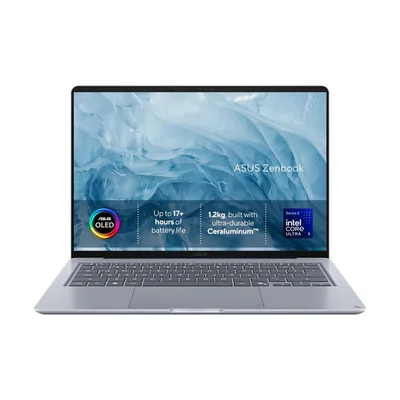
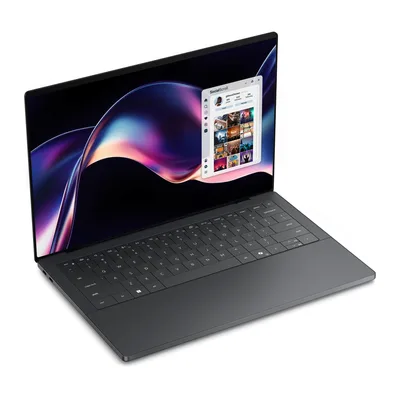
Key differences
- Sharpness XPS 14 wins
The XPS 14 has a noticeably sharper screen, so text looks crisper and you can fit more on screen comfortably.
- Memory XPS 14 wins
The XPS 14 has 32 GB of memory, while the Zenbook 14 has 16 GB. That helps when you keep many apps, tabs or big projects open. Neither can be upgraded later.
- Ports Zenbook 14 wins
Of the two, only the Zenbook 14 has HDMI and USB-A, so you can connect a TV or monitor and plug in USB sticks and older accessories without an adapter.
- Brightness XPS 14 wins
The XPS 14 has the brighter screen, 400 nits against 300, so it's easier to read near a window or on a train.
- Smoothness XPS 14 wins
The XPS 14 has the smoother screen, 120Hz against 60Hz, so scrolling and moving windows look smoother.
- Touchscreen XPS 14 wins
Only the XPS 14 has a touchscreen, handy for scrolling, signing documents and quick taps.
Which one should you choose?
Choose the Zenbook 14 if…
- you connect to a TV or monitor
Choose the XPS 14 if…
- you read or write a lot on screen
- you keep lots of apps and tabs open
- you often work near a window or outdoors
- you want smoother scrolling
Full spec comparison
Both run Windows and have OLED screens, so the choice comes down to the details. The real differences are sharpness, memory and ports.
Green cells with a ✓ mark the better spec in that row. Tick "Show differences only" to hide the rows where they match.
Performance
| Spec | ASUS Zenbook 14 (UX3480AA) | Dell XPS 14 (DA14260) |
|---|---|---|
| Processor | Intel Core Ultra 9 386H | Intel Core Ultra X7 358H |
| Graphics | Intel Graphics | Intel Arc B390 Graphics |
| AI engine (NPU) | 50 TOPS | — |
| Memory (RAM) | 16 GB | 32 GB |
| Memory type | LPDDR5X | LPDDR5X-9600 |
| Maximum memory | 16 GB | 32 GB |
| Memory upgrades | Soldered (not upgradeable) | Soldered (not upgradeable) |
| Storage | 512 GB | 512 GB |
| Storage type | SSD | SSD |
| Storage interface | PCIe 4.0 NVMe M.2 2280 | PCIe 4.0 NVMe M.2 2230 |
| Storage slots | 1 | 1 |
Screen
| Spec | ASUS Zenbook 14 (UX3480AA) | Dell XPS 14 (DA14260) |
|---|---|---|
| Screen size | 14" | 14" |
| Resolution | Full HD+ (1920 x 1200) | 3K (2880 x 1800) |
| Aspect ratio | 16:10 | 16:10 |
| Panel | OLED | OLED |
| Refresh rate | 60 Hz | 120 Hz |
| Variable refresh (VRR) | — | Yes |
| Brightness | 300 nits | 400 nits |
| Colour range | 100% DCI-P3 | 100% DCI-P3 (typical), 95% minimum |
| HDR | None | None |
| Finish | — | Anti-reflective |
| Touchscreen | No | Yes |
Battery and size
The Zenbook 14 weighs 1.2 kg and the XPS 14 1.36 kg, so there's little in it.
| Spec | ASUS Zenbook 14 (UX3480AA) | Dell XPS 14 (DA14260) |
|---|---|---|
| Battery capacity | 70 Wh | 70 Wh |
| Charger | 68 W | 100 W |
| Charges via | USB-C | USB-C (Thunderbolt 4, any of the three ports) |
| Fast charging | 60% in 49 min | 0-35% in 20 min, 0-80% in 1 h, 0-100% in 2 h (ExpressCharge Boost, 100 W adapter) |
| Weight | 1.2 kg | 1.36 kg |
| Dimensions | 311.2 x 215.8 x 13.9-16.9 mm | 309.52 x 209.71 x 14.62 mm |
| Materials | Ceraluminum (ceramic-aluminium) lid with metal chassis | Aluminium lid and base, plastic palmrest with glass touchpad |
| Durability | US MIL-STD 810H military-grade standard | — |
| Colour | Arctic Blue | Graphite |
| Colours available | Komodo Coral, Arctic Blue, Zabriskie Beige | Graphite |
Ports and wireless
The XPS 14 has Wi-Fi 7, the Zenbook 14 Wi-Fi 6E. With a newer router at home, the newer standard is quicker and copes better with busy networks.
| Spec | ASUS Zenbook 14 (UX3480AA) | Dell XPS 14 (DA14260) |
|---|---|---|
| Ports | 1x Thunderbolt 4 (charging, DisplayPort, 40Gbps), 1x USB-C 3.2 Gen 2 (charging, DisplayPort, 10Gbps), 1x USB-A 3.2 Gen 1 (5Gbps), 1x HDMI 2.1 TMDS, 1x 3.5 mm combo audio | 3x Thunderbolt 4 (USB-C, DisplayPort 2.1, Power Delivery; charging on any port), 1x universal audio jack |
| Thunderbolt / USB4 | Thunderbolt 4 | Thunderbolt 4 (3 ports, USB4 v1.0) |
| Card reader | None | None |
| Ethernet | None | None |
| Wi-Fi | Wi-Fi 6E | Wi-Fi 7 |
| Wi-Fi card | — | Intel Wi-Fi 7 BE211 |
| Bluetooth | Bluetooth 5.4 | Bluetooth 6 |
| Mobile data | None | None |
Features
| Spec | ASUS Zenbook 14 (UX3480AA) | Dell XPS 14 (DA14260) |
|---|---|---|
| Webcam | FHD (1080p) + IR | 8MP (2560 x 1440 at 30 fps) + IR |
| Webcam privacy | physical shutter | None |
| Backlit keyboard | Yes | Yes |
| Keyboard | Backlit chiclet, 1.7 mm key travel, Excimer-coated keycaps | Backlit, 81-key UK layout, 19.05 mm key pitch, capacitive touch function row, Copilot key |
| Login | Face | Face |
| Number pad | — | No |
| Touchpad | ErgoSense enlarged touchpad with smart gestures, anti-fingerprint coating | Haptic seamless glass touchpad, 150 x 73.92 mm |
| Speakers | Dual multi-magnet speakers, Dolby Atmos | 2 woofers + 2 tweeters (4 speakers), 10 W total (2x 3 W woofers, 2x 2 W tweeters), Waves MaxxAudio, Cirrus Logic SmartAmp |
| Microphones | Built-in array microphone | Dual digital-array microphones, IntelliGo noise reduction |
| Pen | No | No |
| Security | Firmware TPM, Microsoft Pluton, BIOS user password, IR webcam (Windows Hello) | Kensington lock supported via USB-C ports, Windows Hello face (IR camera) |
Software and model
| Spec | ASUS Zenbook 14 (UX3480AA) | Dell XPS 14 (DA14260) |
|---|---|---|
| Operating system | Windows 11 Home | Windows 11 Home |
| Model number | UX3480AA-U1109W | XDA14260-7585BLK-PGB |
| Released | 2026 | 2026 |