


ASUS Zenbook A14 (UX3407) vs Dell Pro 14 Plus (PB14250)
For most people, the Zenbook A14 is the one to get. It has an OLED screen, it's lighter to carry and it has more storage. The Pro 14 Plus makes more sense if you want to add memory later.
We earn a commission from qualifying Amazon purchases made through our links, at no extra cost to you. This never affects our specs. How we make money.
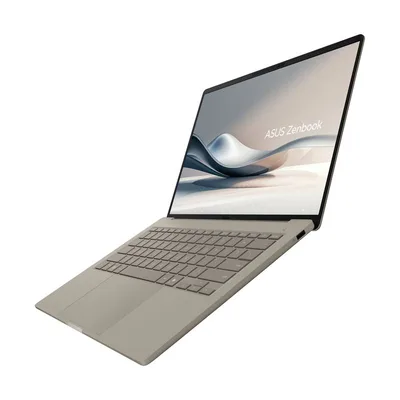
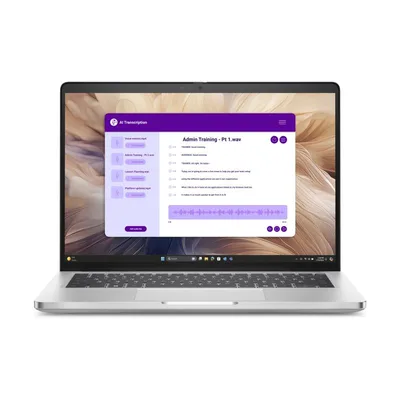
Key differences
- Screen Zenbook A14 wins
The Zenbook A14 has an OLED screen, with true blacks and rich colour, while the Pro 14 Plus has an IPS panel. Photos and films have more punch on the OLED, especially in a dim room.
- Weight Zenbook A14 wins
The Zenbook A14 weighs 0.98 kg, while the Pro 14 Plus weighs 1.53 kg. You'll feel the difference if it goes in your bag every day.
- Storage Zenbook A14 wins
The Zenbook A14 has a 1 TB drive, while the Pro 14 Plus has 512 GB. The bigger drive holds far more photos, music and games before you have to clear space.
- Upgrades Pro 14 Plus wins
Only the Pro 14 Plus lets you add memory later, up to 64 GB. On the Zenbook A14, what you buy is what you keep.
- Brightness Zenbook A14 wins
The Zenbook A14 has the brighter screen, 400 nits against 300, so it's easier to read near a window or on a train.
- HDR Zenbook A14 wins
The Zenbook A14 has a screen with an HDR certificate, so films and games show brighter highlights and deeper shadows. The Pro 14 Plus doesn't support HDR.
Which one should you choose?
Choose the Zenbook A14 if…
- you watch a lot of films or work with photos
- you want something easier to carry
- you keep a big photo, music or game library on the laptop
- you often work near a window or outdoors
Choose the Pro 14 Plus if…
- you want to add memory later
- you work in bright rooms with lots of reflections
Full spec comparison
Both run Windows, so they're aimed at much the same people. The real differences are the type of screen, weight and storage.
Green cells with a ✓ mark the better spec in that row. Tick "Show differences only" to hide the rows where they match.
Performance
| Spec | ASUS Zenbook A14 (UX3407) | Dell Pro 14 Plus (PB14250) |
|---|---|---|
| Processor | Snapdragon X1-26-100 | Intel Core Ultra 5 235U |
| Graphics | Qualcomm Adreno GPU | Intel Graphics |
| AI engine (NPU) | 45 TOPS | — |
| Memory (RAM) | 16 GB | 16 GB |
| Memory type | LPDDR5X | DDR5-5600 |
| Maximum memory | 16 GB | 64 GB |
| Memory upgrades | Soldered (not upgradeable) | Upgradeable (slots) |
| Storage | 1 TB | 512 GB |
| Storage type | SSD | SSD |
| Storage interface | PCIe 4.0 NVMe M.2 2280 | PCIe Gen4 NVMe M.2 2230 (slot takes 2230 or 2280) |
| Storage slots | 1 | 1 |
Screen
The Pro 14 Plus has a matte screen, which cuts reflections from windows and lights. The Zenbook A14 has a glossy one, which reflects more, though some people prefer the look.
| Spec | ASUS Zenbook A14 (UX3407) | Dell Pro 14 Plus (PB14250) |
|---|---|---|
| Screen size | 14" | 14" |
| Resolution | Full HD+ (1920 x 1200) | Full HD+ (1920 x 1200) |
| Aspect ratio | 16:10 | 16:10 |
| Panel | OLED | IPS |
| Refresh rate | 60 Hz | 60 Hz |
| Brightness | 400 nits | 300 nits |
| Colour range | 100% DCI-P3 | 45% NTSC |
| HDR | VESA CERTIFIED Display HDR True Black 600 | None |
| Finish | Glossy | Matte |
| Touchscreen | No | No |
Battery and size
The Zenbook A14 has the bigger battery, 70 Wh against 55 Wh, so it should last longer between charges.
| Spec | ASUS Zenbook A14 (UX3407) | Dell Pro 14 Plus (PB14250) |
|---|---|---|
| Battery life (maker claim) | Up to 32 hours | — |
| Battery capacity | 70 Wh | 55 Wh |
| Charger | 65 W | 65 W |
| Charges via | USB-C | USB-C |
| Fast charging | 60% in 49 minutes | ExpressCharge: 0-60% in 1 h; ExpressCharge Boost: 0-35% in 20 min |
| Weight | 0.98 kg | 1.53 kg |
| Dimensions | 310.7 x 213.9 x 13.4-15.9 mm | 313.5 x 224 x 19.5-21.2 mm |
| Materials | Ceraluminum (lid, keyboard frame and base) | Aluminium chassis |
| Durability | US MIL-STD 810H | — |
| Colour | Zabriskie Beige | Aluminium |
| Colours available | Zabriskie Beige, Iceland Gray | Platinum Silver |
Ports and wireless
| Spec | ASUS Zenbook A14 (UX3407) | Dell Pro 14 Plus (PB14250) |
|---|---|---|
| Ports | 2x USB4 Gen 3 Type-C 40Gbps (display, power delivery; charging via 65W Type-C adapter), 1x USB 3.2 Gen 2 Type-A 10Gbps, 1x HDMI 2.1 TMDS, 1x 3.5 mm combo audio | 2x Thunderbolt 4 (USB-C, Power Delivery 3.1 charging, DisplayPort 2.1), 2x USB-A 3.2 Gen 1 (one with PowerShare), 1x HDMI 2.1, 1x 3.5 mm combo headset jack |
| Thunderbolt / USB4 | USB4 40Gbps | Thunderbolt 4 |
| Card reader | None | None |
| Ethernet | None | None |
| Wi-Fi | Wi-Fi 6E | Wi-Fi 6E |
| Wi-Fi card | — | Intel Wi-Fi 6E AX211 |
| Bluetooth | Bluetooth 5.3 | Bluetooth 5.3 |
| Mobile data | None | None |
Features
| Spec | ASUS Zenbook A14 (UX3407) | Dell Pro 14 Plus (PB14250) |
|---|---|---|
| Webcam | 1080p + IR | 1080p + IR |
| Webcam privacy | — | physical shutter |
| Backlit keyboard | Yes | Yes |
| Keyboard | Backlit chiclet keyboard, 1.3 mm key travel, Copilot key | spill-resistant, AI hotkey (Copilot) key, optional backlight |
| Login | Face | Fingerprint, Face |
| Number pad | No | No |
| Touchpad | ErgoSense touchpad, enlarged, precision, 0.23 mm click depth | Precision clickpad, 125 x 73 mm |
| Speakers | Dual super-linear speakers, Dolby Atmos | 2x 2 W (2.5 W peak), Cirrus Logic CS42L43 |
| Microphones | Built-in array microphone | 2x noise-cancelling digital-array |
| Pen | No | No |
| Security | Firmware TPM, Microsoft Pluton security processor, BIOS setup user password, BIOS boot user password protection, IR webcam with Windows Hello | TPM 2.0, wedge-shaped security lock slot, chassis intrusion switch, camera shutter, fingerprint reader (power button), Windows Hello IR camera |
Software and model
| Spec | ASUS Zenbook A14 (UX3407) | Dell Pro 14 Plus (PB14250) |
|---|---|---|
| Operating system | Windows 11 Home | Windows 11 Pro |
| Model number | UX3407QA-QD244W | BTO106_PB14250_EMEA |
| Released | 2025 | 2025 |