


ASUS Zenbook DUO (UX8406) vs ASUS ProArt P16 (H7606)
The ProArt P16 is the better choice for most people. It plays games far better, it has a bigger battery and it has a card reader. The Zenbook DUO makes more sense if you keep lots of apps and tabs open.
We earn a commission from qualifying Amazon purchases made through our links, at no extra cost to you. This never affects our specs. How we make money.
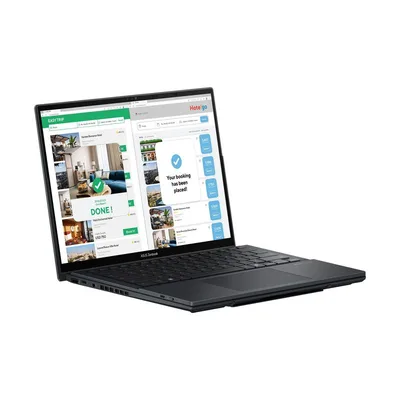
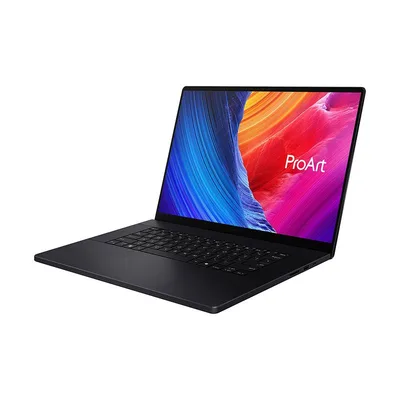
Key differences
- Gaming ProArt P16 wins
The ProArt P16, with its RTX 5070, plays modern games at high settings, while the Zenbook DUO manages light and older games.
- Memory Zenbook DUO wins
The Zenbook DUO has 32 GB of memory, while the ProArt P16 has 16 GB. That helps when you keep many apps, tabs or big projects open. Neither can be upgraded later.
- Screen size Depends on you
The ProArt P16 has a 16-inch screen, the Zenbook DUO a 14-inch one. The bigger screen is easier for spreadsheets, split-screen work and films, and the smaller one is easier to carry.
- Storage Zenbook DUO wins
The Zenbook DUO has a 2 TB drive, while the ProArt P16 has 1 TB. With the smaller drive, more of your photos and games end up in the cloud or on a USB drive.
- Weight Zenbook DUO wins
The Zenbook DUO weighs 1.65 kg and the ProArt P16 1.85 kg, so the Zenbook DUO is a little lighter to carry.
- Battery size ProArt P16 wins
The ProArt P16 has the bigger battery, 90 Wh against 75 Wh, so it should last longer between charges.
Which one should you choose?
Choose the Zenbook DUO if…
- you keep lots of apps and tabs open
- you want something easier to carry
- you keep a big photo, music or game library on the laptop
Choose the ProArt P16 if…
- you want to play new games too
- you want a bigger screen to work on
- you work away from a socket for long stretches
- you copy photos from a camera
Full spec comparison
Both run Windows and have OLED screens, so the choice comes down to the details. The real differences are gaming power, memory and screen size.
Green cells with a ✓ mark the better spec in that row. Tick "Show differences only" to hide the rows where they match.
Performance
The ProArt P16 has a much faster built-in AI chip, which speeds up Windows features like live captions, background blur and on-device AI tools.
| Spec | ASUS Zenbook DUO (UX8406) | ASUS ProArt P16 (H7606) |
|---|---|---|
| Processor | Intel Core Ultra 9 285H | AMD Ryzen AI 9 465 |
| Graphics | Intel Arc Graphics | NVIDIA GeForce RTX 5070 Laptop |
| Graphics memory | — | 8 GB |
| AI engine (NPU) | 13 TOPS | 50 TOPS |
| Memory (RAM) | 32 GB | 16 GB |
| Memory type | LPDDR5X-6400 | LPDDR5X-7500 |
| Maximum memory | 32 GB | 16 GB |
| Memory upgrades | Soldered (not upgradeable) | Soldered (not upgradeable) |
| Storage | 2 TB | 1 TB |
| Storage type | SSD | SSD |
| Storage interface | PCIe 4.0 NVMe M.2 2280 | PCIe 4.0 NVMe M.2 2280 |
| Storage slots | 1 | 2 |
Screen
The ProArt P16 has a slightly brighter screen, 500 nits against 400.
| Spec | ASUS Zenbook DUO (UX8406) | ASUS ProArt P16 (H7606) |
|---|---|---|
| Screen size | 14" | 16" |
| Resolution | 3K (2880 x 1800) | 3K (2880 x 1800) |
| Aspect ratio | 16:10 | 16:10 |
| Panel | OLED | OLED |
| Refresh rate | 120 Hz | 120 Hz |
| Brightness | 400 nits | 500 nits |
| Colour range | 100% DCI-P3 | 100% DCI-P3 |
| HDR | VESA DisplayHDR True Black 500 | VESA CERTIFIED Display HDR True Black 500 |
| Finish | Anti-reflective | — |
| Touchscreen | Yes | Yes |
| Pen standard | MPP 2.0 | MPP 2.0 |
Battery and size
| Spec | ASUS Zenbook DUO (UX8406) | ASUS ProArt P16 (H7606) |
|---|---|---|
| Battery capacity | 75 Wh | 90 Wh |
| Charger | 65 W | 200 W |
| Charges via | USB-C (Thunderbolt 4) | DC-in (rectangular barrel); USB-C PD also supported |
| Fast charging | 60% in 49 min | — |
| Weight | 1.65 kg | 1.85 kg |
| Dimensions | 313.5 x 217.9 x 14.6-19.9 mm | 354.9 x 246.9 x 14.9-17.3 mm |
| Materials | Aluminium, Magnesium | — |
| Durability | MIL-STD-810H | US MIL-STD 810H |
| Hinge | detachable keyboard with built-in kickstand | — |
| Colour | Inkwell Gray | Nano Black |
| Colours available | Inkwell Gray | Nano Black |
Ports and wireless
Only the ProArt P16 has a card reader, so you can copy photos straight from a camera card.
| Spec | ASUS Zenbook DUO (UX8406) | ASUS ProArt P16 (H7606) |
|---|---|---|
| Ports | 2x Thunderbolt 4 (USB-C, charging, DisplayPort, 40Gbps), 1x USB-A 3.2 Gen 1 (5Gbps), 1x HDMI 2.1 (TMDS), 1x 3.5 mm combo audio | 2x USB 3.2 Gen 2 Type-A (10Gbps), 1x USB4 Gen 3 Type-C (40Gbps, display, power delivery), 1x USB 3.2 Gen 2 Type-C (10Gbps, display, power delivery), 1x HDMI 2.1 FRL, 1x 3.5 mm combo audio, 1x SD Express 7.0 card reader, 1x DC-in |
| Thunderbolt / USB4 | Thunderbolt 4 | USB4 40Gbps |
| External displays (max) | 2 | — |
| Card reader | None | SD Express 7.0 |
| Ethernet | None | None |
| Wi-Fi | Wi-Fi 7 | Wi-Fi 7 |
| Bluetooth | Bluetooth 5.4 | Bluetooth 5.4 |
| Mobile data | None | None |
Features
| Spec | ASUS Zenbook DUO (UX8406) | ASUS ProArt P16 (H7606) |
|---|---|---|
| Webcam | 1080p + IR | 1080p + IR |
| Backlit keyboard | — | Yes |
| Keyboard | Detachable soft keyboard, 1.4 mm key travel, Copilot key | Backlit chiclet, 1.7 mm key travel, Copilot key |
| Login | Face | Face |
| Number pad | No | No |
| Touchpad | Precision touchpad, anti-fingerprint coating | Precision touchpad with DialPad |
| Speakers | Smart Amp | 6-speaker system, Dolby Atmos |
| Microphones | array microphone | array microphone |
| Pen | Supported (sold separately) | Supported (sold separately) |
| Security | TPM (firmware), IR webcam with Windows Hello | Firmware TPM, Microsoft Pluton, IR webcam with Windows Hello |
Software and model
The ProArt P16 came out in 2026, the Zenbook DUO in 2024. Newer models usually get software and security updates for longer.
| Spec | ASUS Zenbook DUO (UX8406) | ASUS ProArt P16 (H7606) |
|---|---|---|
| Operating system | Windows 11 Home | Windows 11 Home |
| Model number | UX8406CA-PZ134W | H7606GP-SR011W |
| Released | 2024 | 2026 |