


Microsoft Surface Pro 13 (12th Edition) vs ASUS Zenbook A16 (UX3607)
The Zenbook A16 is the better choice for most people. Its battery lasts longer, it has more memory and it has more of the ports you need. The Surface Pro 13 makes more sense if you want to sketch or mark up documents with a pen.
We earn a commission from qualifying Amazon purchases made through our links, at no extra cost to you. This never affects our specs. How we make money.
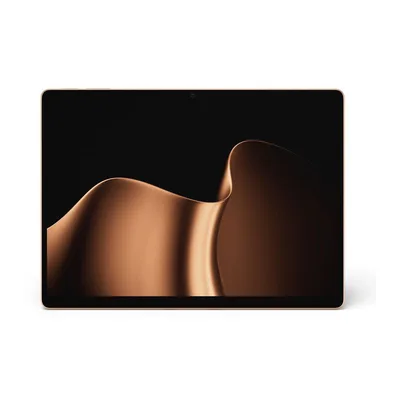
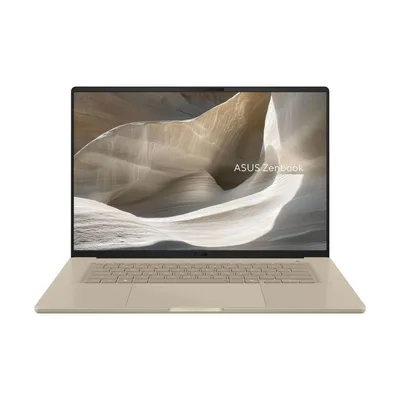
Key differences
- Battery life Zenbook A16 wins
The Zenbook A16 is rated for 21 hours on a charge and the Surface Pro 13 for 15.5. Both figures are best cases, and real use comes in lower on each.
- Memory Zenbook A16 wins
The Zenbook A16 has 48 GB of memory, while the Surface Pro 13 has 16 GB. That helps when you keep many apps, tabs or big projects open. Neither can be upgraded later.
- Screen size Depends on you
The Zenbook A16 has a 16-inch screen, the Surface Pro 13 a 13-inch one. The bigger screen is easier for spreadsheets, split-screen work and films, and here it doesn't cost you any weight.
- Ports Zenbook A16 wins
Of the two, only the Zenbook A16 has HDMI, USB-A and a card reader, so you can connect a TV or monitor and plug in USB sticks and older accessories.
- Pen Surface Pro 13 wins
Only the Surface Pro 13 works with a pen, so you can write notes or sketch straight on the screen.
- Touchscreen Surface Pro 13 wins
Only the Surface Pro 13 has a touchscreen, handy for scrolling, signing documents and quick taps.
Which one should you choose?
Choose the Surface Pro 13 if…
- you want to sketch or mark up documents with a pen
- you like to tap and scroll on the screen
- you read or write a lot on screen
Choose the Zenbook A16 if…
- you work away from a socket for long stretches
- you keep lots of apps and tabs open
- you want a bigger screen to work on
- you connect to a TV or monitor
Full spec comparison
Both run Windows and have OLED screens, so the choice comes down to the details. The real differences are battery life, memory and screen size.
Green cells with a ✓ mark the better spec in that row. Tick "Show differences only" to hide the rows where they match.
Performance
| Spec | Microsoft Surface Pro 13 (12th Edition) | ASUS Zenbook A16 (UX3607) |
|---|---|---|
| Processor | Snapdragon X2 Elite | Snapdragon X2 Elite Extreme X2E-94-100 |
| Graphics | Qualcomm Adreno GPU | Qualcomm Adreno GPU |
| AI engine (NPU) | 80 TOPS | 80 TOPS |
| Memory (RAM) | 16 GB | 48 GB |
| Memory type | LPDDR5X | LPDDR5X |
| Maximum memory | 16 GB | 48 GB |
| Memory upgrades | Soldered (not upgradeable) | Soldered (not upgradeable) |
| Storage | 1 TB | 1 TB |
| Storage type | SSD | SSD |
| Storage interface | PCIe 4.0 removable SSD | PCIe 4.0 NVMe M.2 2280 |
| Storage slots | 1 | 1 |
Screen
The Surface Pro 13 has a slightly sharper screen, so text looks crisper and you can fit more on screen comfortably. The Surface Pro 13 has a slightly brighter screen, 600 nits against 500.
| Spec | Microsoft Surface Pro 13 (12th Edition) | ASUS Zenbook A16 (UX3607) |
|---|---|---|
| Screen size | 13" | 16" |
| Resolution | 3K (2880 x 1920) | 3K (2880 x 1800) |
| Aspect ratio | 3:2 | 16:10 |
| Panel | OLED | OLED |
| Refresh rate | 120 Hz | 120 Hz |
| Variable refresh (VRR) | Yes | — |
| Brightness | 600 nits | 500 nits |
| Colour range | sRGB and Vivid colour profiles | 100% DCI-P3 |
| HDR | Dolby Vision IQ | VESA CERTIFIED Display HDR True Black 1000 |
| Finish | Anti-reflective | — |
| Touchscreen | Yes | No |
| Pen standard | Microsoft Pen Protocol | — |
Battery and size
| Spec | Microsoft Surface Pro 13 (12th Edition) | ASUS Zenbook A16 (UX3607) |
|---|---|---|
| Battery life (maker claim) | Up to 15.5 hours | Up to 21 hours |
| Battery capacity | 53 Wh | 70 Wh |
| Charger | — | 130 W |
| Charges via | USB-C or Surface Connect | USB-C |
| Fast charging | fast charging with minimum 65 W Surface supply or 60 W USB-C PD charger | 50% in 30 minutes |
| Weight | 1.176 kg | 1.2 kg |
| Dimensions | 287 x 209 x 9.3 mm | 353.5 x 242.4 x 13.8-16.5 mm |
| Materials | anodized aluminium | Ceraluminum (ceramic-aluminium) lid, frame and base |
| Durability | — | US MIL-STD 810H |
| Hinge | 165-degree full-friction kickstand | — |
| Colour | Black | Zabriskie Beige |
| Colours available | Platinum, Black | Zabriskie Beige |
Ports and wireless
| Spec | Microsoft Surface Pro 13 (12th Edition) | ASUS Zenbook A16 (UX3607) |
|---|---|---|
| Ports | 2x USB-C / USB4 (both charge, data, DisplayPort 1.4a), 1x Surface Connect (charging), 1x Surface Pro Keyboard port | 2x USB4 Type-C (40Gbps, DisplayPort, charging), 1x USB-A 3.2 Gen 2 (10Gbps), 1x HDMI 2.1, 1x 3.5 mm combo audio, 1x SD 4.0 card reader |
| Thunderbolt / USB4 | USB4 | USB4 40Gbps |
| External displays (max) | 3 | 4 |
| Card reader | None | SD 4.0 |
| Ethernet | None | None |
| Wi-Fi | Wi-Fi 7 | Wi-Fi 7 |
| Bluetooth | Bluetooth 5.4 | Bluetooth 6.0 |
| Mobile data | None | None |
Features
Just the Zenbook A16 has a backlit keyboard, which makes typing in a dim room or on a night train much easier.
| Spec | Microsoft Surface Pro 13 (12th Edition) | ASUS Zenbook A16 (UX3607) |
|---|---|---|
| Webcam | 1440p + IR | 1080p + IR |
| Backlit keyboard | No | Yes |
| Keyboard | — | Backlit chiclet, 1.3 mm key travel, Copilot key |
| Login | Face | Face |
| Number pad | No | No |
| Touchpad | — | ErgoSense precision touchpad, multitouch gestures, enlarged |
| Speakers | 2 W stereo speakers with Dolby Atmos | — |
| Microphones | dual Studio Mics with voice focus | Built-in array microphone |
| Pen | Supported (sold separately) | No |
| Security | Microsoft Pluton security processor, Pluton TPM 2.0, Windows Hello face authentication | Firmware TPM, Microsoft Pluton security processor, BIOS setup user password, BIOS boot user password protection, IR webcam with Windows Hello |
Software and model
| Spec | Microsoft Surface Pro 13 (12th Edition) | ASUS Zenbook A16 (UX3607) |
|---|---|---|
| Operating system | Windows 11 Home | Windows 11 Home |
| Model number | EP2-65073 | UX3607OA-SQ005W |
| Released | 2026 | 2026 |